TikTok remains one of the fastest-growing platforms for short-form video, with over 1.5 billion monthly active users competing for attention in 2026. The challenge for creators is clear: producing enough high-quality content to stay visible without burning out. AI tools have become a practical solution, handling everything from script generation to video editing so creators can focus on ideas rather than production overhead. Whether you are building a personal brand, promoting a product, or experimenting with faceless content, understanding how to use AI video generators effectively can make the difference between a few hundred views and a few million.
The key is not just using AI tools, but using them strategically. The TikTok algorithm in 2026 rewards consistency, early engagement, and content that keeps viewers watching past the first three seconds. In this guide, we will cover the full workflow for creating TikTok videos with AI, from scripting and visual generation to editing, optimization, and posting strategy. We will also look at which AI video tools fit different creator needs and budgets.
Understanding What Makes a TikTok Video Go Viral
Before you start generating content, it helps to understand the mechanics behind virality on TikTok. The algorithm prioritizes watch time, completion rate, shares, and comments. A video that 80% of viewers watch to the end will consistently outperform a longer video with a 30% completion rate, regardless of follower count.
There are a few structural patterns that consistently perform well across niches in 2026:
- Hook in the first 1-2 seconds: Start with a bold visual, a surprising statement, or direct text overlay. Never waste the opening on a logo or intro animation.
- Loopable endings: Videos that seamlessly restart trick the algorithm into counting multiple views.
- Text-on-screen: Roughly 80% of TikTok users watch without sound. Captions and on-screen text are not optional.
- Trend participation with a twist: Using trending sounds or formats but applying them to your specific niche signals relevance to the algorithm.
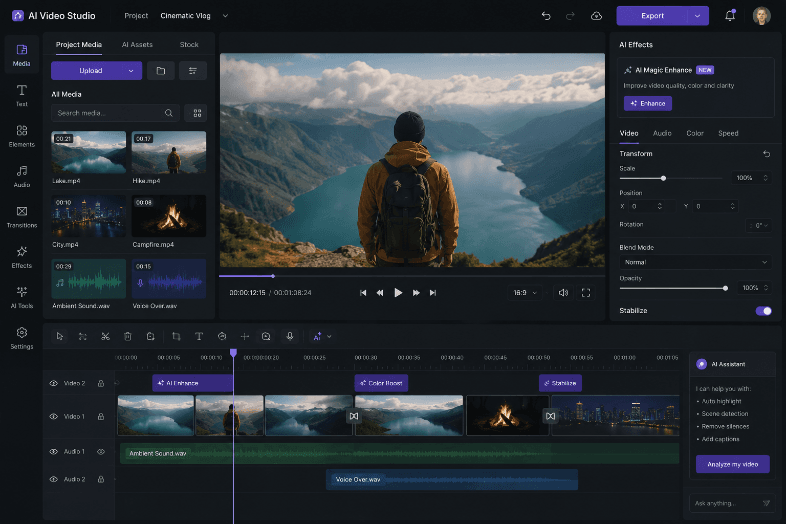
Tools like Runway AI and CapCut have built-in features for auto-captions, background removal, and smart trimming that make it faster to apply these principles at scale.
Step 1: Generate Your Script with AI
The foundation of any high-performing TikTok video is a tight, engaging script.
AI writing tools like ChatGPT, Claude, and Gemini can generate short-form scripts — but the real difference comes from giving them the right structure.
A simple prompt framework that works:
-
Define the format
“Write a 45-second TikTok script in a ‘did you know’ format.” -
Set the hook
“Start with a surprising stat or a counterintuitive claim.” -
Add a CTA
“End with a question to drive comments and engagement.”
Go one step further with TransClipper
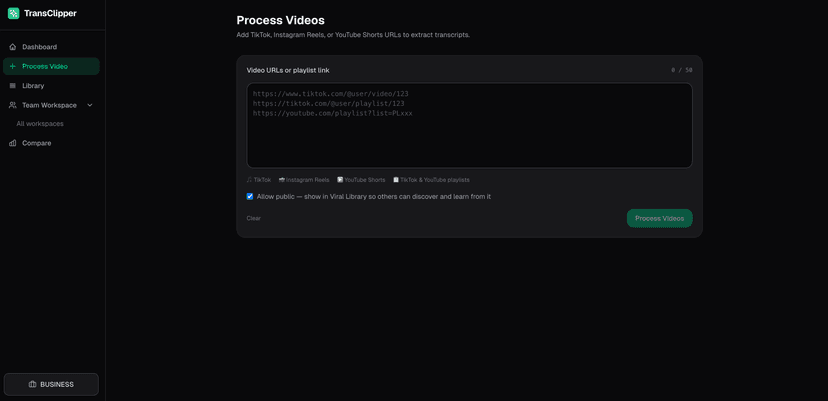
Instead of starting from scratch, you can use TransClipper to reverse-engineer what’s already working.
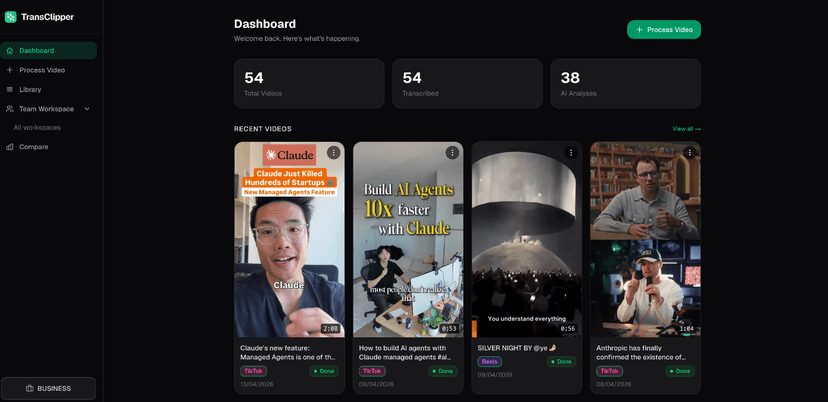
Turn viral videos into proven content ideas:
- Paste a TikTok, Reel, or YouTube Short
- Extract the hook, structure, and key patterns
- Rebuild your own version based on what performs
This gives you a massive advantage — you're not guessing, you're replicating proven formats.
For faceless channels, you can take it further by:
- Generating voiceover scripts with AI
- Converting them into speech with text-to-speech tools
Some of the best-performing niches in 2026:
- AI news roundups
- “Things you didn’t know” explainers
- Product comparisons
If your content involves turning text into video, script generation (and reverse-engineering viral content) is the first step to winning 🚀
Step 2: Create Visuals and Video Clips
Once your script is ready, you need visuals. There are three main approaches depending on your content style:
Text-to-Video Generators
Tools like InVideo AI, Creatify, and Revid can take a text prompt or script and produce a complete video with stock footage, transitions, and voiceover. These work best for informational or listicle-style content where you do not need original footage.
AI Image and Art Generators
For creators who want a more stylized look, AI art generators can produce custom visuals that stand out from generic stock footage. You can generate backgrounds, character illustrations, or scene compositions and then animate them with tools like CapCut or Pika. Exploring styles like cartoon-style AI art on creative platforms can give your videos a distinctive visual identity that viewers remember.
Screen Recording + AI Enhancement
Many successful TikTok creators record their screen (tutorials, reactions, software demos) and then use AI tools to enhance the footage. Auto-captions, background noise removal, smart cropping for vertical format, and color correction can all be handled by AI editing tools.
Regardless of your approach, keep the output vertical (9:16 aspect ratio) and under 60 seconds for maximum algorithmic reach. The AI image generation tools compared guide covers the best options for creating still assets you can animate.
Step 3: Edit and Optimize for the Algorithm
Raw AI output usually needs polish before posting. Here is a practical editing checklist:
- Add captions: Use CapCut or Descript for auto-generated, styled captions. Place them in the center-lower third of the screen to avoid overlap with TikTok's UI elements.
- Tighten pacing: Cut dead space ruthlessly. Every second must deliver value or visual interest.
- Add trending audio: Even if your video has voiceover, layering a trending sound underneath (at low volume) can boost distribution.
- Include a CTA overlay: "Follow for more" or a question in the final frame. Keep it simple.
- Optimize thumbnails: TikTok now shows cover images in search results. Use a clean, high-contrast frame with readable text.
Tools like TikCut specialize in AI-powered editing specifically for TikTok format. They automate many of these steps so you can go from raw footage to polished output in minutes rather than hours. For music and audio generation, AI tools can create original background tracks that avoid copyright strikes.
Step 4: Build a Posting Strategy That Compounds
Posting one great video is not enough. Consistency is what the TikTok algorithm rewards most heavily. Here is a data-backed posting framework:
| Strategy Element | Recommendation |
|---|---|
| Posting frequency | 1-3 videos per day for growth phase |
| Best posting times | 7-9 AM, 12-1 PM, 7-10 PM (audience local time) |
| Content mix | 60% trending formats, 30% evergreen, 10% experimental |
| Hashtag strategy | 3-5 niche-specific tags + 1-2 broad tags |
| Series content | Create multi-part series to drive follow-through |
Batch-producing content with AI makes this frequency achievable even for solo creators. Spend one session generating 5-7 scripts, another session creating visuals, and a third session editing. This assembly-line approach keeps quality high while maintaining volume. An AI visual workflow tool can help automate repetitive steps in this pipeline, connecting script generation to image creation to final export.
For creators looking to amplify their online presence, combining TikTok with cross-posting to Instagram Reels and YouTube Shorts multiplies your reach without additional production work.
Step 5: Analyze Performance and Iterate
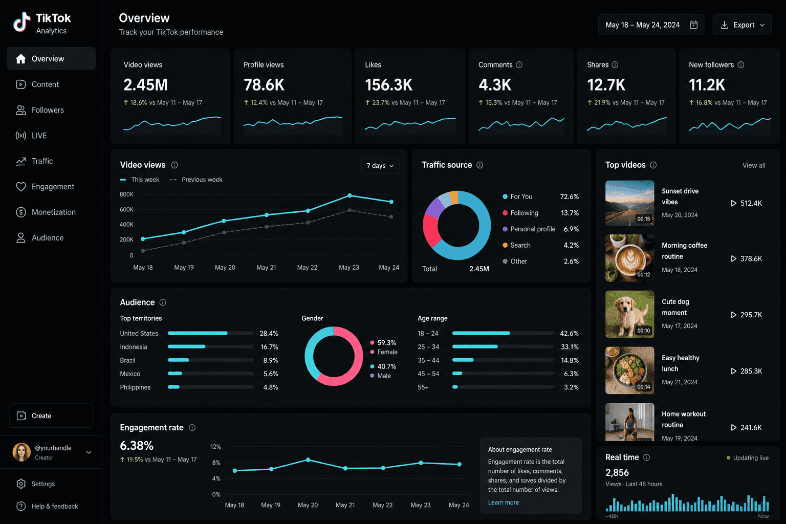
The difference between creators who go viral once and those who do it consistently is iteration. TikTok's built-in analytics show you:
- Average watch time: If viewers drop off before the 3-second mark, your hook needs work.
- Traffic sources: "For You" page traffic means the algorithm is picking up your content. Profile views mean your existing audience is driving views.
- Audience demographics: Time zone, age, and interest data help you refine both content and posting schedule.
Use this data to double down on what works. If a particular format or topic gets 10x the average views, create variations of it. AI makes this easy since you can generate five versions of a script with slightly different angles and test them all within a week. Understanding how AI-generated video content performs in practice helps set realistic expectations for what AI can and cannot automate.
Common Mistakes to Avoid
Even with AI tools, several mistakes consistently kill TikTok performance:
- Over-polished content: TikTok audiences respond to authenticity. Overly corporate or stock-footage-heavy videos feel out of place. Mix AI-generated assets with real footage or a personal voiceover.
- Ignoring trends: The algorithm favors content that participates in current trends. Use AI to speed up trend response time, not to avoid trends entirely.
- No hook strategy: If your first frame does not create curiosity or conflict, viewers will scroll past. Test different hook styles (question, statistic, visual shock) and track which ones retain viewers.
- Neglecting engagement: Replying to comments, creating response videos, and stitching other creators' content all signal activity to the algorithm. These cannot be fully automated.
Understanding how TikTok's moderation and blocking works is also important for managing your comment section and maintaining a healthy creator account.
Frequently Asked Questions
What is the best AI tool for making TikTok videos in 2026?
There is no single best tool since it depends on your content type. CapCut is the most widely used for editing and auto-captions. InVideo AI and Creatify work well for text-to-video generation. For custom visuals, dedicated AI music and video creation tools and art generators give you more creative control than stock footage.
Can I make a faceless TikTok channel with AI?
Yes. Many successful channels use AI-generated voiceovers, stock footage, and text-to-video tools to produce content without showing a face. The most profitable niches for faceless content include finance tips, AI news, motivational quotes, and educational explainers. Some creators also use AI-generated headshots as channel avatars to build a visual brand without ever appearing on camera.
How long should a TikTok video be for maximum reach?
Videos between 15-45 seconds tend to get the best completion rates, which directly affects algorithmic distribution. Longer videos (1-3 minutes) can work for tutorial content, but they need strong hooks and pacing to maintain watch time.
Will AI-generated content get flagged or penalized by TikTok?
TikTok does not currently penalize AI-generated content as long as it follows community guidelines. However, content that is fully automated with no human creative input tends to underperform because it lacks the authenticity that drives engagement. The best approach is to use AI as a production accelerator while adding your own creative direction. You can also use background removal tools to clean up assets before assembling your final video.
How often should I post on TikTok to grow?
Most growth experts recommend 1-3 posts per day during your growth phase. Quality matters more than quantity, but the algorithm does reward consistent posting. Using AI tools to batch-produce content makes this frequency sustainable without sacrificing quality across your content marketing strategy.
What is the best time to post on TikTok?
General high-engagement windows are 7-9 AM, 12-1 PM, and 7-10 PM in your target audience's time zone. However, your specific audience may differ. Check TikTok analytics after your first 20-30 posts to find your optimal windows.
How do I add trending sounds to AI-generated videos?
Most AI video generators output silent or voiceover-only videos. Add trending sounds in TikTok's native editor before posting. Keep the trending sound at low volume if you have voiceover, and at full volume if the video relies on text overlays. Browse TikTok's "trending" sound library or watch top creators in your niche to find current audio trends. For a deeper dive into animation-specific editors, Explee is one option worth exploring for whiteboard and explainer-style TikToks.
Conclusion
Making viral TikTok videos with AI is less about finding a single tool and more about building a repeatable workflow. Script with AI, generate visuals using text-to-image or text-to-video tools, edit for platform-specific best practices, and post consistently while analyzing what resonates. The creators who succeed on TikTok in 2026 are the ones who treat content production as a system rather than a one-off creative effort. AI tools handle the production bottlenecks, freeing you to focus on the creative and strategic decisions that actually drive virality.