Turning a static photograph into a short video clip used to require frame-by-frame editing in professional software like After Effects. In 2026, AI image-to-video models can handle the entire process in under a minute. Whether you want to add subtle motion to a product shot, bring a landscape photo to life, or create scroll-stopping social media content, the tools available today make it accessible to anyone with a browser. If you are evaluating your options, the best AI video generators compared for 2026 is a solid starting point for understanding the current landscape.
The core workflow is simple: upload an image, describe the motion you want, and let the model generate a video. But the quality of your results depends heavily on which tool you pick, how you prepare your source image, and how specific your motion prompt is. This guide covers each step in detail, drawing on insights from the broader AI tools ecosystem, so you can get consistent, high-quality animated clips from your still photos.
How AI Image Animation Works
AI image-to-video models analyze the content of a still image, identify objects, depth layers, and scene context, then predict how those elements would naturally move over time. Most current models use diffusion-based architectures trained on millions of video clips to learn realistic motion patterns.
The process typically involves three stages. First, the model segments the image into distinct elements (foreground subject, background, sky, water, etc.). Second, it generates a motion map based on your text prompt and the identified elements. Third, it renders frames by progressively transforming the original image while maintaining visual consistency. Tools in the AI video category use variations of this pipeline, though each implements it differently.
Choosing the Right AI Model
Not every image-to-video model produces the same results. Your choice should depend on the type of source material you are working with and the style of motion you need.
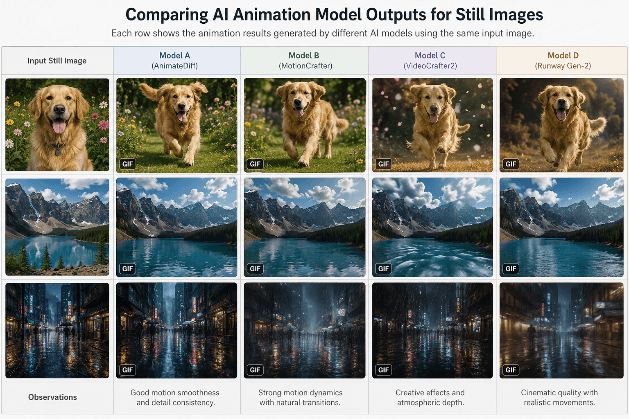
Kling Video 3.0 handles natural scenes well. Landscapes, portraits, and product shots all produce smooth motion with this model. It supports 16:9 aspect ratios and generates clips up to 10 seconds. It works best when the source image has clear depth separation between foreground and background. If you have worked with Runway AI before, Kling offers a comparable experience with stronger performance on human subjects.
Seedance 2.0 excels at character animation and complex body movement. If your still image features a person or animal, Seedance tends to produce more natural articulation than competing models. It is particularly strong for social media content where realistic human motion matters, similar to the techniques used in AI marketing video production.
Veo 3.1 from Google DeepMind produces high-fidelity clips with accurate physics simulation. Reflections, fabric movement, and particle effects look more convincing than with most alternatives. Generation times are longer, but the quality premium is noticeable for professional use cases.
For creators already working with AI image generation tools, animating your AI-generated images is a natural next step that adds significant production value.
Preparing Your Source Image
Image quality directly affects animation quality. A few preparation steps make a meaningful difference in your results.
Resolution matters. Most models downsample internally, but starting with a higher resolution image (1024x1024 or larger) gives the model more detail to work with. If your source is low resolution, run it through an upscaler first. PNG format preserves more detail than JPEG in areas with subtle gradients like skies or water. For source images that need cleanup, free background remover tools can help isolate subjects before animation.
Composition affects output. Images with clear foreground, midground, and background layers animate more convincingly because the model can apply different motion speeds to each layer, creating parallax depth. Flat compositions with everything at the same focal distance tend to produce less dynamic results. The same depth principles apply when working with AI image editors to prepare your source material.
Lighting consistency is key. Images with strong directional lighting give the model clear cues about surface orientation, which helps it generate shadows and reflections that move realistically. Flat, evenly lit photos often produce animations that feel artificial. If you need to enhance lighting before animating, NanoPhoto AI is one option for adjusting photo lighting with AI.
Writing Effective Motion Prompts
Your text prompt is the primary control you have over how the animation looks. Vague prompts like "make it move" produce unpredictable results. Specific, descriptive prompts produce consistent output.
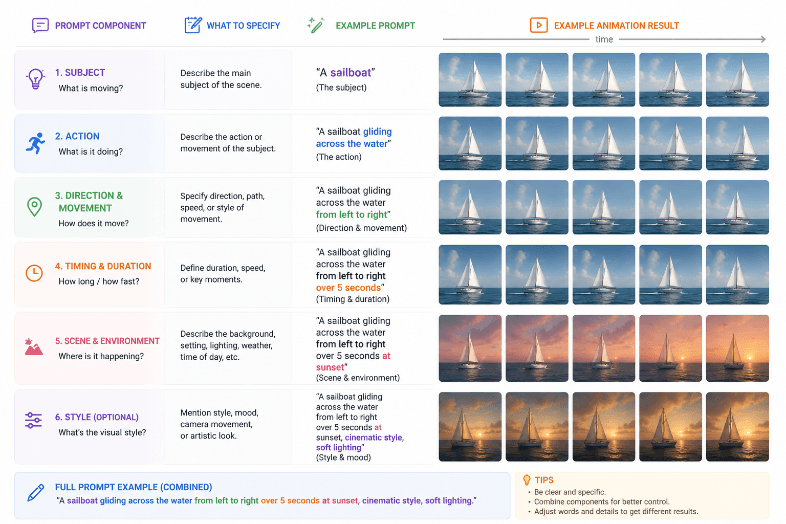
Here are prompt strategies that work well across most models:
- Describe specific elements: "Clouds drifting left to right, water rippling gently, trees swaying in light wind" tells the model exactly what to move
- Include camera motion: "Slow push forward" or "subtle parallax shift" adds cinematic depth
- Specify intensity: "Gentle breeze" vs. "strong wind" produces very different movement scales
- Reference physics: "Hair floating as if underwater" gives the model a concrete physical reference
If you want to go further and create full videos from text descriptions alone, the process for turning text into video with AI follows similar prompting principles.
Many creators also use real-time AI image tools to generate the source images before animating them, which gives full creative control over both the starting frame and the motion.
Practical Use Cases
AI image animation has moved beyond novelty into practical production workflows. Here are the most common applications in 2026:
Social media content. Animated product photos consistently outperform static posts in engagement metrics across Instagram, TikTok, and LinkedIn. A 3-5 second animation of a product image can increase click-through rates by 2-3x compared to the still version. For platform-specific tips, see how creators are making viral TikTok videos with AI.
E-commerce listings. Online stores are using animated product shots to show items from multiple angles or demonstrate features without full video production. A still product photo animated with subtle rotation or environment motion looks professional and loads faster than traditional video. Paired with AI-generated thumbnails from tools like ThumbMagic, animated product visuals can significantly boost listing performance.
Website hero sections. Animated backgrounds and hero images create visual interest without the bandwidth cost of full video. Many brands are replacing static hero images with AI-animated versions that add subtle motion, like gently moving clouds or flowing water.
Professional headshots and portraits. Photographers are offering animated versions of headshots as an upsell service. The technique works well for professional AI headshots where subtle motion (blinking, slight head turn) creates a living portrait effect.
Common Mistakes to Avoid
Several pitfalls trip up beginners when animating still images with AI. Avoiding these will save time and produce better results.
Using heavily compressed JPEG sources introduces artifacts that the model amplifies during animation. Always start with the highest quality version of your image. Over-prompting is another common issue; asking for too many simultaneous motions (wind, rain, camera pan, subject movement) often produces chaotic results. Focus on 2-3 motion elements per clip. If you are exploring the broader AI art generation space, the same principle applies: simpler prompts usually produce cleaner outputs.
Ignoring aspect ratio compatibility causes cropping issues. Check which ratios your chosen model supports before uploading. Most handle 16:9 and 1:1, but some struggle with vertical 9:16 content. For design-focused work, browsing tools in the AI design category can help you find the right tool for your specific format needs.
FAQ
What file formats work best as source images for AI animation? PNG files produce the best results because they preserve full detail without compression artifacts. JPEG works too, but use the highest quality setting available. Most models also accept WebP. Avoid heavily compressed images, as artifacts get amplified during animation. If your image needs enhancement first, the Recraft image tool can help with format conversion and upscaling.
How long are AI-animated video clips? Most models generate clips between 3 and 10 seconds. Kling supports up to 10 seconds per generation, while Veo 3.1 typically produces 4-8 second clips. You can extend length by chaining multiple generations together, using the last frame of one clip as the input for the next. For longer-form content, dedicated video editing tools like TikCut can help you stitch clips into polished sequences.
Can I animate AI-generated images, or only real photos? Both work well. AI-generated images from tools listed in image generation comparisons often animate cleanly because they tend to have consistent lighting and clear subject separation. Real photos work equally well if they meet the resolution and quality guidelines above.
Is AI image animation free? Several tools offer free tiers with limited generations per day. Kling, Seedance, and Veo all have free access options, though queue times may be longer. Paid plans typically offer faster processing, higher resolution output, and more generations. Browse the AI video tools category to compare free vs. paid options across the major platforms.
What resolution should my source image be? Aim for at least 1024x1024 pixels. Higher resolution gives the model more detail to work with and produces smoother animation. Images under 512px often result in blurry or artifact-heavy output. If you need to upscale first, several tools covered in the Flux AI review include built-in upscaling alongside image generation.
Can I control which parts of the image move? Yes, most advanced models support motion masks or region-based prompting. You can specify that only the background should move while the subject stays static, or vice versa. This is useful for product shots where you want the environment to animate around a stationary item. The results parallel what you see in AI-generated design concepts where selective motion draws attention to specific elements.
Do animated images work for email marketing? Animated GIFs and short MP4 loops work in most email clients. Keep file sizes under 5MB for email compatibility. Many AI animation tools offer GIF export specifically for this use case, and animated email headers consistently show higher engagement than static versions. For more on AI-driven marketing visuals, see how content marketing services are integrating animated content into their workflows.
Conclusion
AI image animation in 2026 is practical, accessible, and producing results that rival traditional motion graphics for many use cases. The key steps remain consistent across tools: start with a high-quality source image, write specific motion prompts, and choose a model that matches your content type. As these models continue to improve, the gap between AI-animated clips and traditional video production is narrowing rapidly. For a broader look at the tools shaping this space, explore the full AI video tools directory or check out the Explee animation platform review for a dedicated animation-focused option.