Marketing video production has shifted dramatically over the past two years. What once required a full production crew, weeks of editing, and five-figure budgets can now be handled by a single marketer with the right AI video tools. The barrier to entry is essentially gone, and the quality ceiling keeps rising.
That said, "AI can make videos" is not a strategy. The teams seeing real returns in 2026 are the ones who understand where AI fits in their workflow, what it does well, and where it still falls short. This guide walks through the practical steps of creating marketing videos with AI, from scripting to final output, based on what actually works today. If you are evaluating tools for your team, the latest AI video generator comparison is a good starting point for narrowing your shortlist.
Start with the Script, Not the Tool
The biggest mistake marketers make with AI video is jumping straight into a tool without a clear brief. AI generators are only as good as the input they receive. Before opening any platform, define three things:
- The hook (first 3 seconds): What stops the scroll? A question, a stat, a visual surprise.
- The core message (15-45 seconds): One idea, clearly stated. Not three.
- The CTA (last 5 seconds): What should the viewer do next?
Most AI marketing tools now accept text prompts or full scripts as input. The more specific your script, the less time you spend re-generating clips. Write your script in a plain document first, then feed it to the tool. This approach saves hours compared to iterating inside the generator.
Choosing the Right AI Video Generator
Not all AI video tools solve the same problem. The market has split into distinct categories, and picking the wrong type wastes both time and budget.
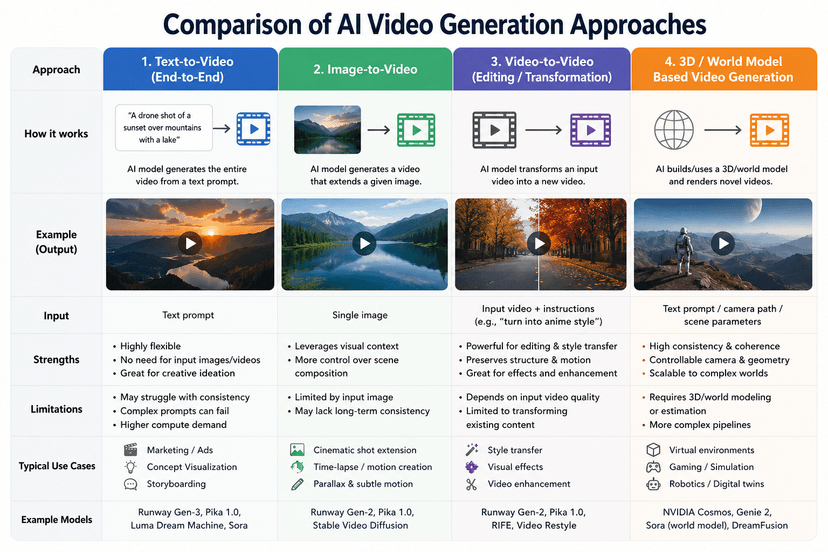
Text-to-video generators like Runway, Kling, and Veo 3 create original footage from prompts. These work best for product teasers, social media ads, and concept videos where you need visuals that do not exist yet. If you want to understand how text-to-video pipelines work under the hood, including API-based image generation pricing, the economics are more accessible than most teams expect.
Avatar-based platforms like Synthesia and HeyGen generate talking-head videos from scripts. These are ideal for training videos, personalized outreach, and explainer content where a human presenter adds credibility. Synthesia now offers 240+ avatars across 130 languages, making localization almost trivial.
Template editors like InVideo AI, Pictory, and Lumen5 turn text into video by matching your script to stock footage, transitions, and music. These produce the most predictable results and work well for blog-to-video repurposing, social clips, and internal communications.
| Type | Best For | Typical Cost | Output Time |
|---|---|---|---|
| Text-to-video | Ads, teasers, social content | $20-100/mo | 1-5 min per clip |
| Avatar-based | Training, explainers, outreach | $30-150/mo | 2-10 min per clip |
| Template editors | Blog repurposing, social clips | Free-$50/mo | Under 5 min |
The Production Workflow That Actually Works
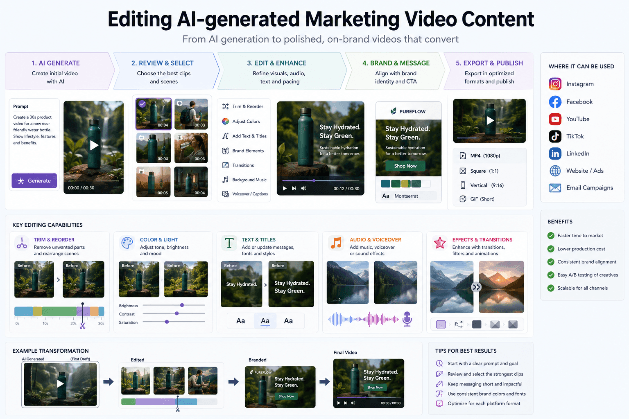
After testing dozens of approaches, the workflow below consistently produces the best results in the least time. Most content marketing teams can adopt it within a day.
- Write the script in a shared doc with timestamps and visual notes
- Generate 3-5 variations of each key scene using your chosen AI tool
- Select the best clips and arrange them on a timeline
- Add voiceover using AI text-to-speech or record your own
- Layer music and sound effects from royalty-free libraries
- Export in platform-specific formats (9:16 for Reels/TikTok, 16:9 for YouTube, 1:1 for feed posts)
The critical step most people skip is number 2. Generating multiple variations and selecting the best output produces significantly better results than trying to perfect a single generation. Think of it like photography: professionals take hundreds of shots to get ten great ones.
Optimizing for Each Platform
A single marketing video rarely works across all platforms without modification. The strategies that amplify your online presence depend on matching format to platform expectations.
TikTok and Instagram Reels: Vertical 9:16, under 60 seconds, text overlays required (85% of viewers watch without sound). The hook must land in the first second. For specific tactics on short-form content, see this guide on making viral TikTok videos with AI.
YouTube: Horizontal 16:9, 2-10 minutes for ads. YouTube rewards watch time, so pacing matters more than flashiness. Include chapters and a strong thumbnail.
LinkedIn: Square 1:1 or horizontal, 30-90 seconds. Professional tone, data-driven hooks. Subtitles are essential since autoplay is muted. A strong SEO strategy for AI tools can amplify the organic reach of your LinkedIn video content beyond paid distribution.
Email and landing pages: Embedded GIFs or short loops (under 15 seconds) load faster and autoplay in most clients without sound requirements.
Handling the Weak Spots
AI video generation still has clear limitations that marketers need to plan around:
- Consistency across clips: AI-generated scenes often shift in lighting, color grade, or style between cuts. Use color correction in post-production to unify the look.
- Text rendering: Most generators still struggle with on-screen text. Add text overlays in a traditional editor after export.
- Brand guidelines: AI tools rarely maintain exact brand colors and typography without fine-tuning. Overlay your brand elements manually or use template-based tools that let you lock in brand kits.
- Hands and fine details: Close-up shots of hands, products with text, or complex physical interactions still produce artifacts. Frame these shots wider or use real footage for product demos.
For teams that need polished visual assets alongside their video content, pairing a video generator with creative design tools for thumbnails, title cards, and social graphics creates a more cohesive output.
Measuring What Works
The point of marketing video is not to produce content. It is to drive results. Track these metrics from day one:
- View-through rate (VTR): What percentage of viewers watch to the end? Below 30% means your hook or pacing needs work.
- Click-through rate (CTR): Are viewers taking the intended action? Benchmark against your non-video content.
- Cost per completed view: Compare your AI video costs against traditional production. Most teams see a 5-10x reduction.
- Conversion rate: The only metric that matters for bottom-line impact. A/B test AI video against static images and carousels.
Using AI-powered image generation for thumbnail testing alongside your video campaigns can improve CTR by 15-25%, since the thumbnail often determines whether the video gets played at all.
FAQ
What is the best free AI video generator for marketing in 2026?
InVideo AI and Canva's AI video features offer the most capable free tiers for marketing use. InVideo AI allows up to 10 minutes of weekly exports on free plans with watermarks. For a broader comparison of free options, check the Runway AI deep dive which covers pricing tiers across major platforms.
How long should an AI marketing video be?
Platform determines length. TikTok and Reels perform best at 15-30 seconds. YouTube ads work well at 30 seconds to 2 minutes. LinkedIn video should stay under 90 seconds. The shorter the format, the more important your opening hook becomes.
Can AI videos replace professional video production?
For social media ads, explainers, and internal content, yes. For brand campaigns, TV spots, and high-production storytelling, AI works better as a prototyping and iteration tool alongside traditional production. The best AI music generators can handle soundtrack creation, but complex audio design still benefits from human expertise.
Do I need to disclose that a marketing video was made with AI?
Disclosure requirements vary by platform and jurisdiction. The EU AI Act requires labeling AI-generated content in advertising. Meta and TikTok both have AI content labels. Best practice: add a small disclosure in the video description rather than the video itself. Transparency builds trust without hurting performance.
What resolution should AI marketing videos be exported at?
Export at 1080p minimum for all platforms. Some tools like Runway and Kling now support 4K output, but file sizes increase significantly. For social media, 1080p at 30fps is the standard. YouTube supports 4K, but most viewers watch on mobile where the difference is negligible. For high-quality thumbnails and stills, dedicated AI design tools can upscale frames beyond what video exports provide.
How do I maintain brand consistency across AI-generated videos?
Build a brand kit document that includes hex color codes, font names, logo placement rules, and tone guidelines. Feed this into template-based tools that support brand kits. For text-to-video generators, include specific style instructions in every prompt. Review the first batch carefully and save prompts that produce on-brand results as templates.
Is AI video good enough for paid ad campaigns?
Yes, and the data supports it. Multiple case studies from 2025-2026 show AI-generated video ads performing within 5-15% of professionally produced ads on Meta and TikTok, at a fraction of the cost. The key is A/B testing. Generate multiple variations, run them against each other, and scale the winners. Understanding how retailers allocate marketing budgets can help you benchmark your AI video ad spend against industry standards. This rapid iteration capability is one of AI video's strongest advantages over traditional production.