Introduction
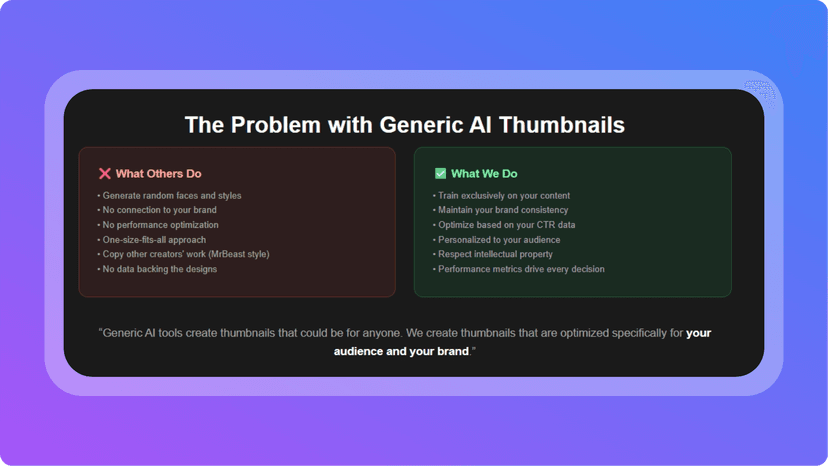
In the world of content creation, thumbnails can make or break engagement. A great video or post often gets overlooked if the thumbnail doesn’t immediately catch attention. I’ve been testing out VibeFrame, an AI-driven thumbnail generator that doesn’t just spit out random designs — it actually learns your face and style to keep everything consistent and recognizable. After spending time training the system with my own images and experimenting with the instant generation modes, I’ve seen firsthand how it can streamline the branding process while still leaving room for creativity.
What is VibeFrame?
VibeFrame is an AI-powered thumbnail generation tool built specifically for creators who want to stay on-brand without spending hours in Photoshop or Canva. The platform analyzes your uploaded library of images and builds a personalized AI model that learns your face, colors, and aesthetic choices. Instead of relying on generic templates, it generates thumbnails that look like they came directly from your established brand identity. Whether you’re focused on YouTube, Twitch, or other content-heavy platforms, the appeal lies in how natural and “you” the results feel.
How It Works
The process starts with uploading a set of your own images. This “trains” the AI on your unique style and visual identity. From there, you can either:
- Use Instant Modes for quick, plug-and-play thumbnail creation.
- Or dive into Personalized Training, where the AI sharpens its accuracy based on your feedback.
I particularly liked that the editor lets you refine generated thumbnails with small adjustments — colors, text, or layouts — without having to start over from scratch. Over time, the model adapts, meaning your thumbnails get progressively more aligned with your content style. The end result is a workflow that feels like having a personal designer on call, but at AI speed.
My Personal Experience
 When I first tried VibeFrame, I started with the free tier to get a sense of what it could do. I uploaded around a dozen thumbnails from my channel and a few behind-the-scenes images, and the AI quickly picked up on my preferred color palette and framing style. The instant generation mode was surprisingly effective for creating usable thumbnails in just a couple of clicks, but it was when I tried the personalized training that I really saw its potential. The thumbnails felt like natural extensions of my brand, not generic AI output. What impressed me most was the consistency — I no longer had to worry about mismatched tones or awkward cropping. It saved me hours I’d usually spend tweaking designs manually.
Pricing
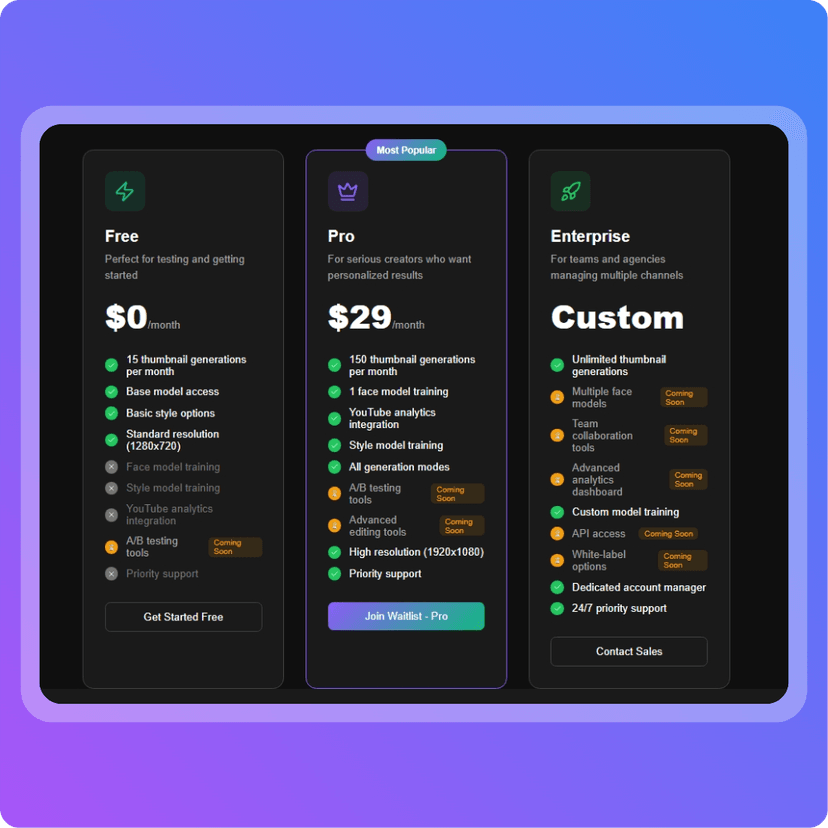 VibeFrame offers a free tier that includes 15 images per month, which is great for testing the waters or for smaller creators. For those with higher output needs, the premium plans scale up based on the number of monthly images and personalization features. The value here is that you’re essentially paying for brand consistency and speed — something that usually requires a dedicated designer or expensive software.
Pros and Cons
Pros:
- AI learns your style and face for consistent branding.
- Free plan available for light users.
- Fast results with instant modes.
- Personalized training refines thumbnails over time.
- Easy to use without design expertise.
Cons:
- Free tier is limited to 15 images/month.
- Premium plans could feel pricey for very small creators.
- Works best with a strong starting image library.
Conclusion
VibeFrame fills a very real gap for creators who want professional, on-brand thumbnails but don’t have the time or skills to design them from scratch. What makes it stand out isn’t just the AI generation, but the way it evolves with your brand identity the more you use it. If tools like LyricEdits help musicians with videos and SocialAF.ai helps marketers scale content campaigns, VibeFrame is the visual counterpart for creators who live and die by click-through rates.
For anyone tired of the thumbnail grind but serious about keeping their brand polished, VibeFrame is worth a try.