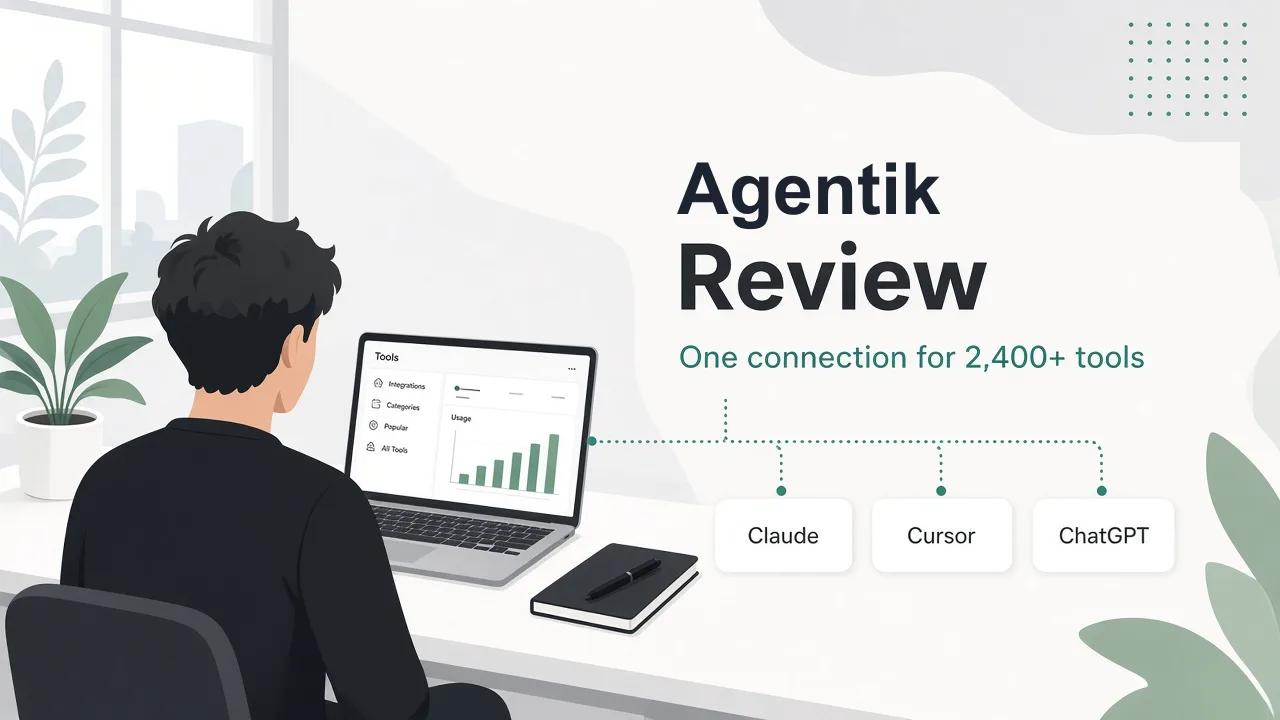
Welcome to this Agentik review.
If you've tried to make an AI agent genuinely useful, you've probably hit the same wall. The agent itself is capable, but the moment it needs to search Google, scrape a page, pull TikTok data, generate an image or check an ad account, you need another API. And every API means its own account, its own key, its own payment method, often a monthly plan, and another invoice at the end of the month. By the time an agent can do real research, you're managing a small zoo of vendor dashboards.
Agentik is aiming squarely at that problem. The pitch is simple: connect your agent once over MCP, top up one balance, and let it call tools from dozens of providers at the provider's own price, with spending limits you control.
Here's what I actually tested. I signed up with an email account, created a workspace (thedirectori.es), walked every page of the dashboard, created an API key named "Review Test" while exploring its spending-limit options, and opened the Add credits flow without paying. I did not run a tool call. The dashboard has no run button: the free task and the playbooks run only through a connected agent app (Claude, ChatGPT, Codex, Cursor and others). So this review doesn't score live latency or output quality; it covers the setup, catalog, pricing and controls I could verify hands-on.
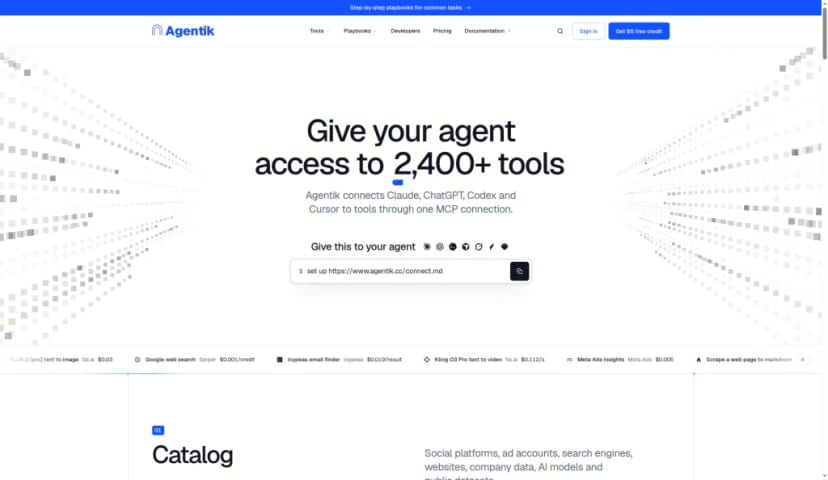
The homepage promise: "Give your agent access to 2,400+ tools," with a one-line setup you hand to your agent.
The idea: one connection instead of 25 accounts
The homepage headline is "Give your agent access to 2,400+ tools," and the subhead explains the mechanism: "Agentik connects Claude, ChatGPT, Codex and Cursor to tools through one MCP connection." Setup is meant to be delegated to the agent itself. You give it the line set up https://www.agentik.cc/connect.md and it follows the guide. The supported agents listed are Claude, ChatGPT, Codex, Cursor, Grok, Hermes Agent and OpenClaw. If you are still choosing the agent itself, our roundup of the best AI tools for developers in 2026 is a practical shortlist.
The marketing claims are specific: 2,429 tools from 52 providers, one prepaid balance at the provider's price, 0% markup on tool calls, the price shown before each call, failed calls not billed, per-key hourly, daily, lifetime and per-tool limits, and 101 playbooks.
The billing comparison section makes the case most clearly. Going direct means 25+ accounts, payment methods, API keys and invoices. Through Agentik, it's one of each, with no monthly plans.
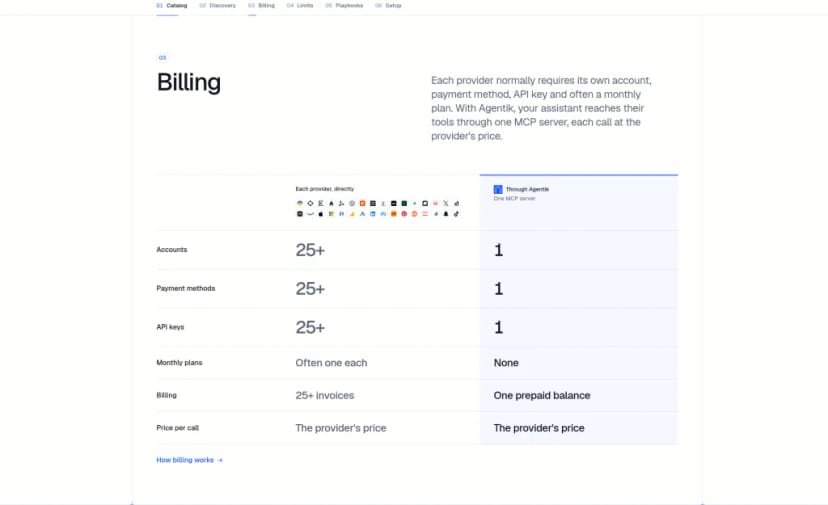
The billing comparison: 25+ accounts, keys and invoices going direct, versus one of each through Agentik.
The homepage also shows example prices, which help make "provider price" concrete:
- FLUX.2 [pro] text to image (fal.ai): $0.03
- Serper Google web search: $0.001 per credit
- Firecrawl scrape: $0.0025 per credit
- Tavily agent search: $0.008
- ElevenLabs v3 text to speech: $0.1 per 1,000 characters
- Browserbase session: $0.002 per minute
- Nano Banana Pro: $0.15 per image
- Kling O3 Pro text to video: $0.112 per second
- Meta Ads insights: $0.005; Meta Ads budget change: $0.05 (preview free)
Signing in and the first dashboard
Sign-in offers Google, GitHub or email. I used email, and that choice mattered: the Overview page greeted me with "No free trial credit on this account. Free trial credit goes to accounts created with Google or GitHub." If you want the $5 promo credit that eligible new accounts can receive, sign up with Google or GitHub.
The Overview is built as a three-step onboarding: Connect your app, Try a free task, Add credits. The left nav covers Overview, Tools, Playbooks, Logs, Usage & billing, Connect your agent, API keys, Budgets & alerts, Team and Settings. It's a tidy, developer-friendly layout.
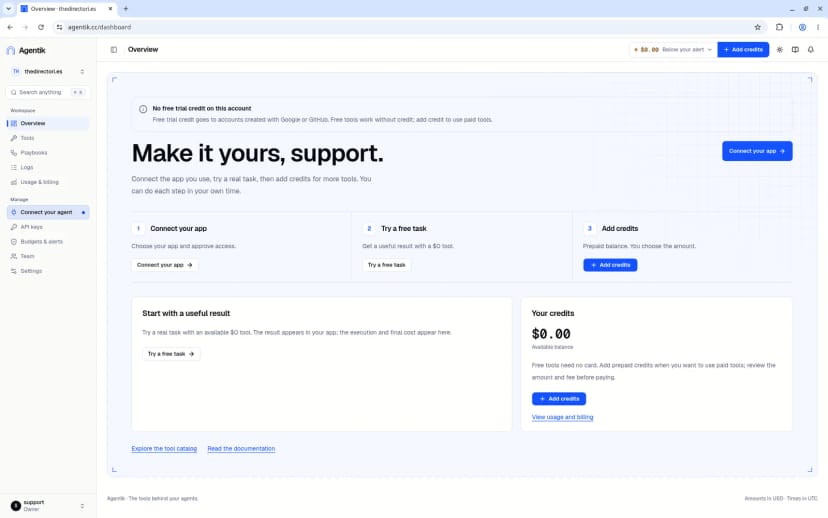
The Overview: a clear three-step start, plus a notice that email sign-ups don't receive the free trial credit.
One small rough edge: a brand-new account immediately shows a "Below your alert" badge in the header. That's because the default low-balance threshold is $5 and a new account starts at $0. It's harmless, but a little alarming on day one.
The tools catalog is the heart of the product
The in-app catalog showed "2,288 tools, 54 providers, live catalog" on the day I checked, with 161 free tools and 17 starred by Agentik. Note that this differs from the homepage's 2,429 tools from 52 providers. Since it's a live catalog, counts move, so treat any number as a snapshot.
The categories lean heavily toward growth, marketing and research work:
- Social media: 399 tools (TikTok 123, Instagram 77, YouTube 40, X 36, Reddit 32 and more)
- Chinese platforms: 583 tools (Douyin 241, Bilibili 85, Weibo 56)
- Advertising: 603 tools (Amazon Ads 103, Meta Ads 51)
- SEO & analytics: 155 tools
Prices typically start from $0.001 per call.
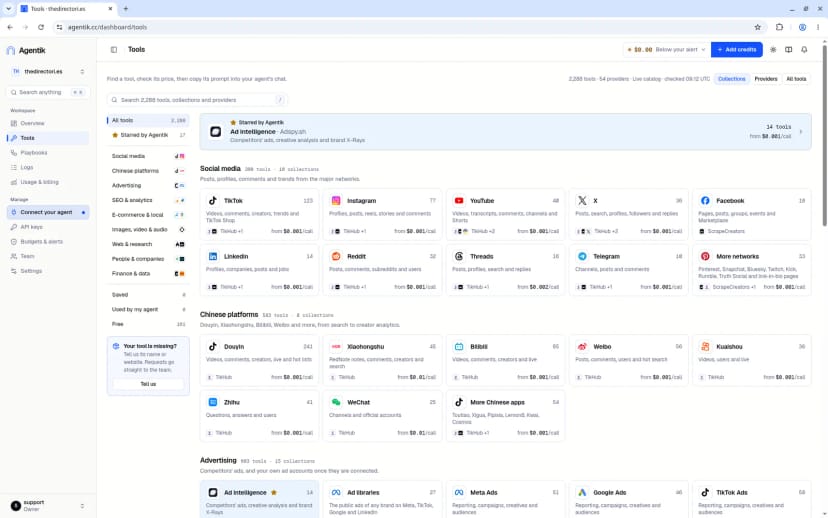
The live catalog, grouped by category, with tool counts and starting prices on every card.
Opening a tool shows a lot of useful detail. For DataForSEO's Google organic SERP, the panel says it "Reserves $0.006, metered, billed at the provider's reported cost," with a reservation cap of $20 and a provider rate of $0.002 per SERP of 10 results. Tabs cover Docs, Prompts, Details, Input schema and Estimate (the estimate executes nothing), and the schema lists every parameter: keyword, location, language, device, depth and more.
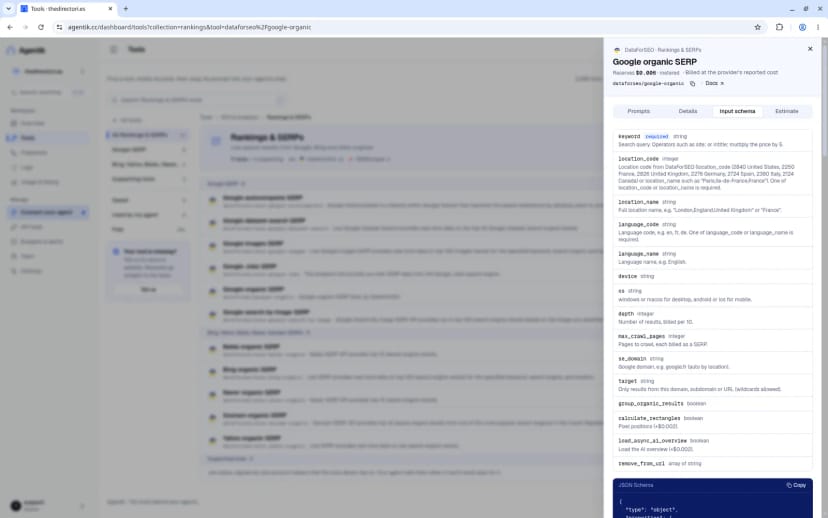
Tool detail for DataForSEO's Google organic SERP: reservation amount, metered billing note and the full input schema.
The reserve-versus-metered wording took me a moment to parse. The reserved amount is a hold, and the final charge follows what the provider reports. Once that clicks, it's a sensible model, but a short explainer near the price would help newcomers.
Playbooks turn tools into ready-made workflows
Playbooks are where Agentik becomes approachable for non-developers. There are 101 of them, "priced from the live catalog," and each one is a prompt you copy into your agent, which then runs the steps. Examples in the SEO section include:
- AI visibility audit: up to $3.35
- Keyword research: up to $0.54
- SEO competitor analysis: up to $0.51
- Local SEO audit: up to $0.14
- Technical SEO audit: up to $0.08
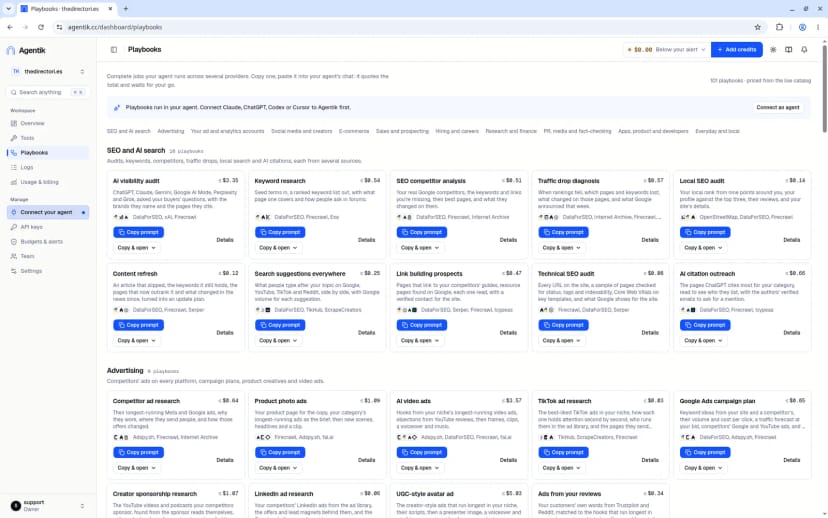
The playbook library, grouped by use case, with a maximum cost shown on each card.
The Keyword research playbook breaks down into six steps across three providers: DataForSEO (up to $0.25), Firecrawl for 15 pages (up to $0.04) and Exa for 5 searches (up to $0.26). Seeing the cost per step before anything runs is a genuinely nice touch.
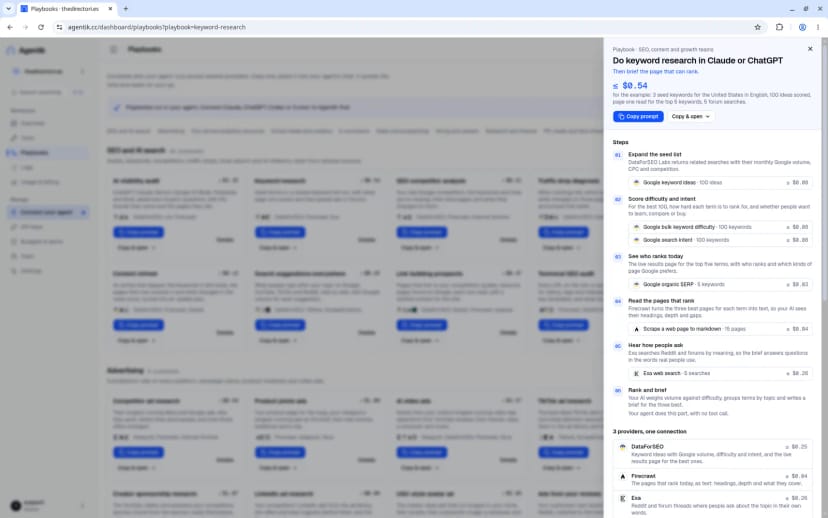
Keyword research, step by step: each provider and its cost ceiling are listed before you copy the prompt.
Connecting your agent
The Connect your agent page has tabs for Claude Desktop, Claude Code Desktop, Claude Code, ChatGPT, Codex, Cursor, Hermes, Muse and Other clients. The MCP endpoint is https://ai.agentik.cc/mcp over Streamable HTTP, with OAuth 2.1 or a Bearer key for auth. Claude Desktop is added as a custom connector; Cursor uses a setup prompt with OAuth approval in the browser. A helpful detail: "OAuth clients inherit the key's limits," so the guardrails follow the connection.
For ad accounts, the page notes that reads cost $0.005 and heavy reports or applied changes cost $0.05.
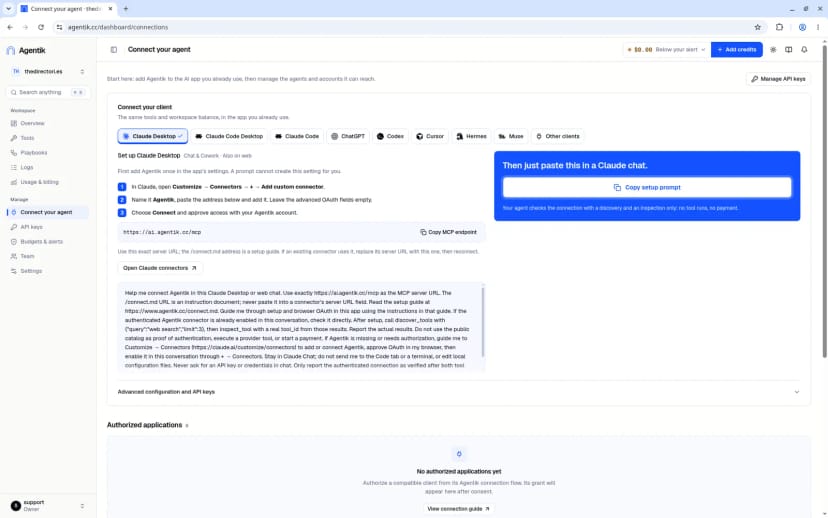
Per-client setup instructions, the MCP endpoint and a copyable setup prompt for Claude Desktop.
API keys and spending limits are taken seriously
The API keys page follows a "One key per agent" philosophy, and secrets are shown only once. When I created the "Review Test" key, the optional settings offered:
- Daily limit, resetting at midnight UTC
- Lifetime limit, total spend since the key was created
- Hourly limit, over a rolling 60 minutes
- Per-tool daily limits for individual tools
The dialog states: "Limits include confirmed charges and pending reservations. Failed calls and refunded amounts do not count." An Access & expiry tab adds a tool allowlist (for example serper/*), allowed IPs or CIDRs, and an expiry date.
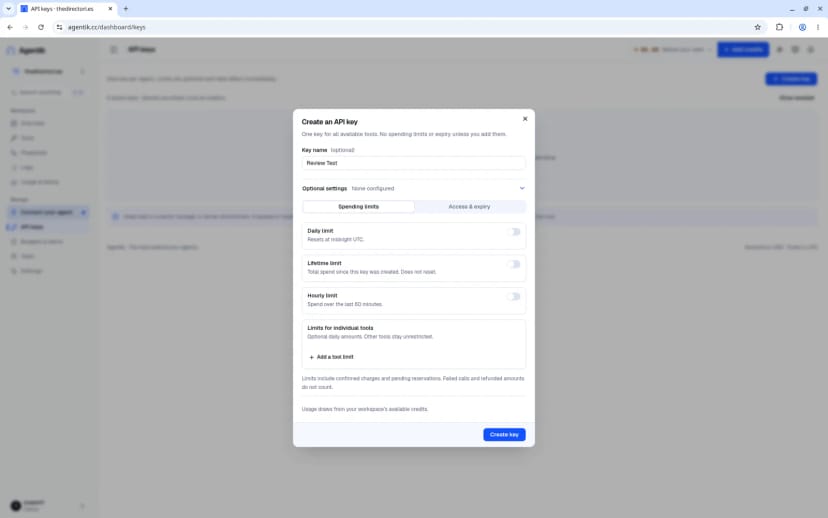
Creating the "Review Test" key: daily, lifetime, hourly and per-tool limits, all optional.
Budgets, alerts, logs and billing
Budgets & alerts lets you set a low-balance threshold (default $5), turn on "Pause suspicious keys automatically" (an anomaly detector), add an alert email and configure a signed webhook. For anyone letting an agent spend real money unattended, this page is reassuring.
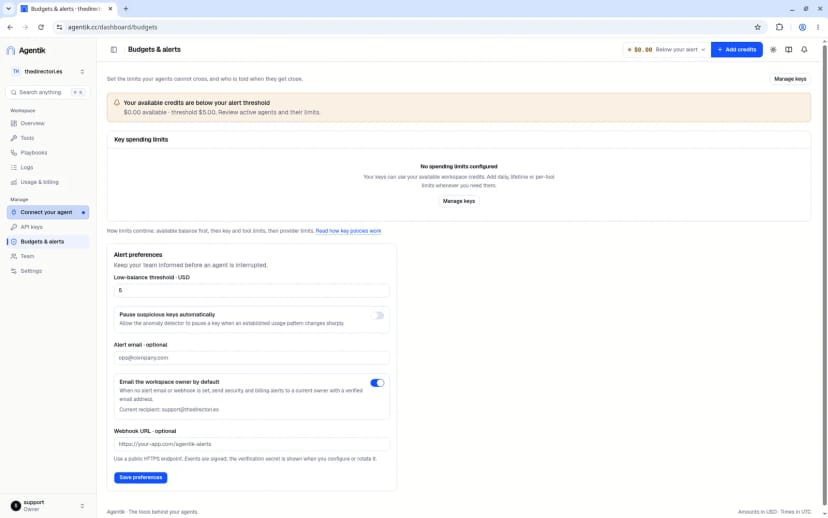
Budgets & alerts: low-balance threshold, automatic pausing of suspicious keys, alert email and signed webhooks.
Logs can be filtered by status, key and "needs review." Usage & billing shows available, reserved and 30-day spent balances, call counts and success rate, with Export CSV and tabs for Funding, Credit ledger and Documents. On a fresh account all of these were empty, as expected.
Trying the free task (and why I couldn't finish it)
"Try a free task" points to a Frankfurter currency exchange rates tool at $0 per request and gives you a prompt to copy. The catch is noted right on the page: "Connect your app before asking it to run this task." Free requests also have daily limits.
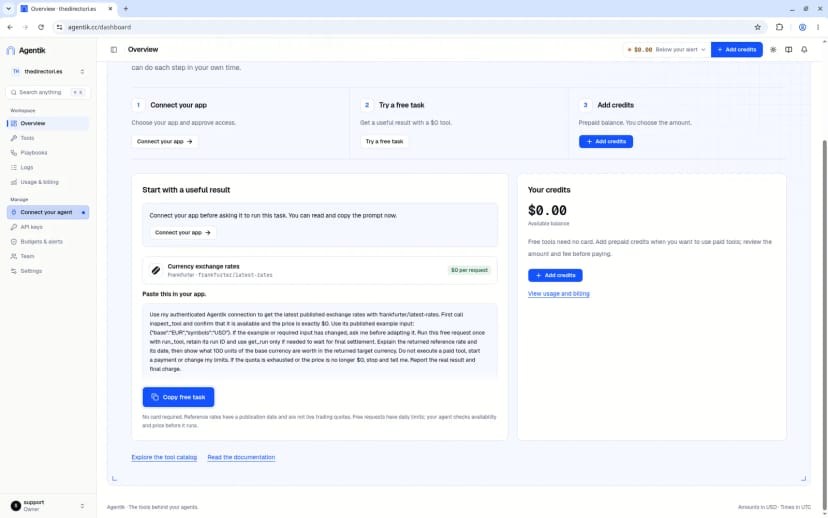
The free task: a $0 currency-rates request, delivered as a prompt you paste into your connected agent.
The step label suggests you'll get a result from the dashboard, but nothing runs there. Everything executes through your agent. That's consistent with the product's design, but it's worth knowing before you click.
Pricing
Agentik has two tiers:
- Free: $0, no card required, access to free tools. Eligible new accounts can get $5 promo credit (in my case, not for email sign-ups).
- Pay as you go: the provider's price with 0% markup on tool calls. There's a platform fee on top-ups: no fee on a first top-up of $10 or less, otherwise 5.5% (minimum $0.80) added on top. For example, $100 of credit plus a $5.50 fee comes to $105.50 before tax.
Payment is card only (no crypto or wallets). Both tiers include MCP (OAuth or API key) and REST access, separate keys with caps, receipts for every call and team invites.
The Add credits dialog offers presets of $5, $10, $25, $50 and $100, or any amount from $5 to $10,000, and checkout runs through Stripe. I opened it but didn't pay. One small bug: the dialog's Close button didn't close it for me, though pressing Escape did.
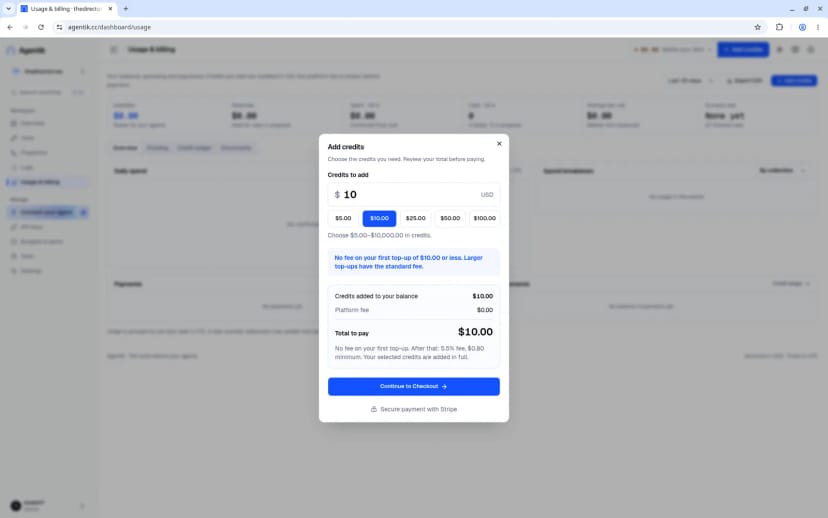
Add credits: preset amounts, the platform fee shown upfront and Stripe checkout.
Who should use Agentik (and who should pause)
Agentik is a strong fit if you:
- Already use Claude, ChatGPT, Codex, Cursor or another MCP client and want it to reach many APIs without signing up for each
- Do SEO, social listening, ad research or market research and want ready-made, priced playbooks
- Need hard spending caps per agent before letting automation touch real money
- Prefer prepaid, pay-per-call pricing over a stack of monthly subscriptions
You may want to pause if you:
- Expect to run tasks from a web dashboard without an agent app; Agentik doesn't work that way
- Use only one or two APIs heavily, where a direct account may be just as simple
- Need crypto or wallet payments
- Want a free trial credit but prefer email sign-up
If what you need is private help during a live interview or meeting, rather than API access for an agent, the HuddleMate review covers that kind of assistant.
FAQ
What is Agentik? A tool gateway that connects AI agents to 2,400+ tools from 50+ providers through one MCP connection and one prepaid balance.
Which agents does it support? The site lists Claude, ChatGPT, Codex, Cursor, Grok, Hermes Agent and OpenClaw. The dashboard also has setup guides for Claude Code, Muse and other MCP clients, plus REST access.
Does Agentik add a markup? It advertises 0% markup on tool calls. A platform fee applies to top-ups: none on a first top-up of $10 or less, otherwise 5.5% with a $0.80 minimum.
Is there a free option? Yes. The free tier gives access to free tools with no card (161 at the time I checked). Eligible new accounts that sign up with Google or GitHub can receive $5 promo credit.
Am I charged for failed calls? According to Agentik, failed calls are not billed, and they don't count toward key limits.
Can I limit what an agent spends? Yes. Each key supports hourly, daily, lifetime and per-tool limits, plus a tool allowlist, IP restrictions and an expiry date.
Can I run tools from the dashboard? No. You can browse, estimate and copy prompts, but execution happens through a connected agent app.
Conclusion
Agentik takes a real, growing headache, the sprawl of accounts and keys an agent needs to be useful, and replaces it with one connection, one balance and clear per-call prices. The catalog is broad, especially for social, advertising and SEO work, the playbooks show their costs step by step, and the key-level spending controls are some of the most thoughtful I've seen in this category. I couldn't judge live output quality or speed, since execution requires a connected agent, so treat this as a review of the setup, pricing and controls rather than the results.
What I liked:
- One MCP connection and one prepaid balance in place of dozens of vendor accounts
- Provider pricing with 0% markup on tool calls, and prices visible before anything runs
- A large live catalog with strong social, advertising and SEO coverage
- 101 playbooks with step-by-step cost ceilings
- Detailed per-key limits (hourly, daily, lifetime, per-tool), allowlists, IP rules and expiry
- Budgets & alerts with automatic pausing of suspicious keys and signed webhooks
Things to keep in mind:
- Nothing runs from the dashboard; you need a connected agent app, even for the free task
- Email sign-ups don't receive the free trial credit; Google or GitHub accounts may
- Tool counts vary between the homepage and the live catalog, so expect numbers to move
- Reserve-versus-metered pricing wording takes a moment to understand
- Minor polish issues: an immediate "Below your alert" badge on new accounts, an Add credits Close button that didn't respond, and some slow-loading pages
- Card payments only, with a 5.5% platform fee on most top-ups
Try it: https://www.agentik.cc/