Let's be honest: using AI assistants can feel like having the same conversation with someone who has selective amnesia. Every. Single. Time.
"Remember when I told you I'm lactose intolerant?" "What were those three project requirements I mentioned yesterday?" "Here are my preferences again..."
Sound familiar? If you're nodding right now, you're not alone. This is the universal frustration of anyone who uses ChatGPT, Claude, or other AI tools regularly.
MemoryPlugin promises to fix this. And after testing it extensively, I can tell you, it actually does.
The Problem With AI Memory (Or Lack Thereof)
Here's the thing: AI assistants are brilliant. They can write code, analyze data, brainstorm ideas, and explain quantum physics. But they have the memory of a goldfish.
Every conversation starts from zero. You spend the first 10 minutes re-explaining context that you've already shared five times before. It's exhausting, inefficient, and honestly? Kind of insulting to both you and the AI.
MemoryPlugin solves this by giving your AI long-term memory. Not just for one platform, but across ChatGPT, Claude, Gemini, and 14 other AI platforms.
Let's dive into what makes this tool special.
What Makes MemoryPlugin Different
1. Memory Buckets: Organization That Actually Makes Sense
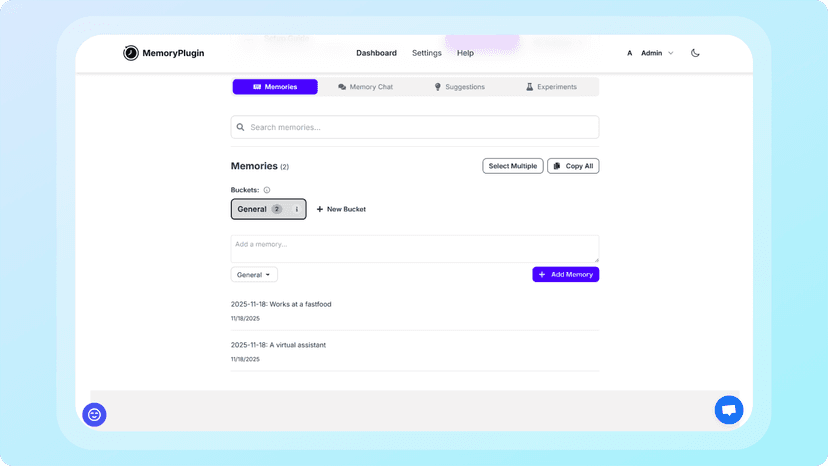
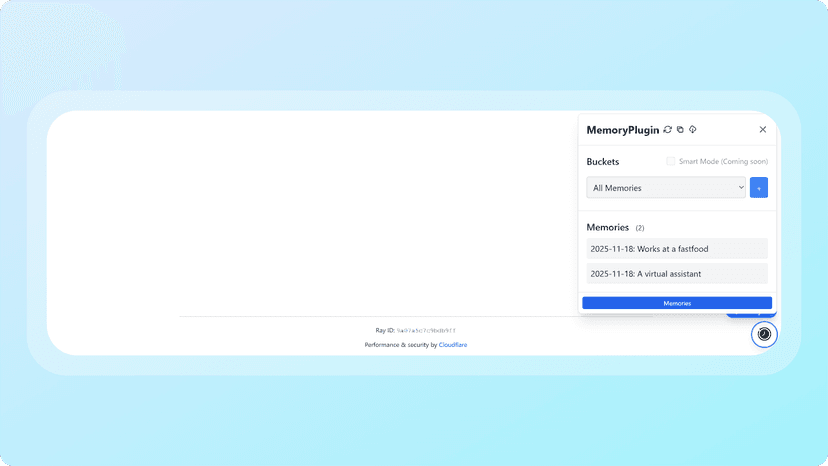
The standout feature here is Memory Buckets, and it's genuinely clever.
Instead of dumping everything into one massive file (hello, chaos), you create separate buckets for different contexts:
- Work projects: Client briefs, project specs, team preferences
- Personal goals: Fitness routines, learning objectives, habit tracking
- Creative writing: Character details, plot threads, world-building notes
- Health tracking: Medical history, symptoms, treatment plans
- Financial planning: Budget goals, investment strategy, expense patterns
When you start a conversation, you activate the relevant bucket. Your AI loads only that context: nothing more, nothing less.
Why this matters:
- Faster processing: No wasted tokens on irrelevant information
- Better focus: AI stays on track without context confusion
- Privacy control: You decide what gets loaded when
- Clean organization: Easy to scan, edit, and maintain
It's like having separate notebooks instead of one chaotic journal. Simple, but game-changing.
2. Smart Memory: The Token-Efficiency Breakthrough
Here's where MemoryPlugin gets really impressive.
Traditional memory tools load everything upfront. Got 50,000 words of context? Congratulations, you just burned through half your token limit before typing a single word.
Smart Memory takes a different approach:
- Memories are automatically organized into categories
- Each category gets a high-level summary
- The AI receives these summaries first
- Full memories load only when actually needed
The result? 90% fewer tokens used.
Think about it: Your AI gets a bird's-eye view of what you've stored, then drills down only when necessary. It's like scanning chapter titles before reading the full book.
This means longer conversations, faster responses, lower costs, and better context retention. Win-win-win-win.
3. Chat History Import: Your AI Gets Total Recall
This is the feature that made me go "wow."
You can import your entire conversation history from ChatGPT, Claude, or TypingMind. Every discussion, every project, every piece of context you've ever shared—instantly accessible.
How it works:
- Export your chats from your AI platform
- Upload to MemoryPlugin (processing takes 30-60 minutes)
- Your AI now remembers everything
Real-world example:
Let's say you ask your AI to create a workout routine. With chat history memory, it can automatically reference:
- Your body composition from 6 months ago
- Exercise preferences you mentioned
- What helped you stay consistent
- Your injury-prone areas
- Time commitments
- Dietary restrictions
- Fitness goals
You get a truly personalized recommendation without spending an hour re-explaining everything. That's the power of memory.
4. Cross-Platform Memory: Freedom From Platform Lock-In
Here's what really sets MemoryPlugin apart: your memory works across 17 different AI platforms.
ChatGPT, Claude, Gemini, TypingMind, Grok, Mistral, Google AI Studio, Poe, Perplexity, Qwen, ChatLLM, Deepseek, Kimi, LibreChat, MCP, OpenRouter, Z.ai (GLM).
Your memory follows you everywhere.
Why this is huge: Most AI memory tools build one integration and call it done. MemoryPlugin built custom solutions for each platform: custom GPTs, browser extensions, TypingMind plugins, OpenAPI specs. They optimized for the best experience on each platform, not a one-size-fits-all compromise.
As the AI landscape continues to fragment, this cross-platform approach is invaluable. You're not locked in. You're free to use the best tool for each task.
5. Multiple Ways to Integrate
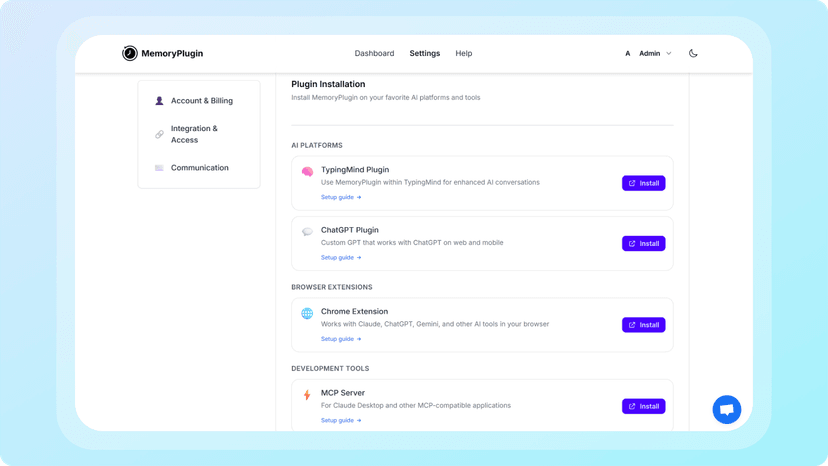
MemoryPlugin meets you where you work:
- Browser Extension: Chrome and Safari. Works with all ChatGPT tiers (Free, Plus, Team, Pro). One-click activation. The Safari extension works on iOS, Chrome on Android via Kiwi or Yandex browsers. AI memory on mobile? Yes, please.
- Custom GPT: Available in the GPT Store. Memory activates automatically. No longer requires ChatGPT Plus.
- MCP (Model Context Protocol): For developers building custom AI workflows.
- TypingMind Plugin: Custom-built for TypingMind users.
- OpenAPI Spec: For custom integrations and other platforms.
Pick your preferred method and run with it. The flexibility is refreshing.
6. Privacy First (Actually)
Privacy concerns with AI tools are real. MemoryPlugin addresses this head-on:
- Chat history is encrypted
- Delete anything, anytime
- They never train on your data
- Your data is yours forever
Given recent concerns about AI companies using user data for training, this privacy-first approach matters.
Pricing: Surprisingly Reasonable
Core Plan - $10/month or $50/year
- Last 500 conversations from Claude OR ChatGPT
- Memory buckets
- Smart Memory
- Cross-platform support
Pro Plan - $25/month or $99/year
- Unlimited imports from both ChatGPT AND Claude
- All Core features
- Priority support
Let's be real: $50/year for the Core plan is about $4/month. If this tool saves you even 30 minutes a month, it's paid for itself. The Pro plan at $99/year is excellent value for heavy AI users.
The Verdict
MemoryPlugin solves a real, frustrating problem elegantly. It doesn't overcomplicate things. It just works.
| Pros ✅ | Cons ❌ |
|---|---|
| Memory Buckets: Organize context by project/topic for cleaner, faster processing | No free tier: Can't test before committing (though pricing is reasonable) |
| Smart Memory: 90% token efficiency through intelligent categorization | Learning curve: Takes time to set up and organize buckets effectively |
| Chat history import: Import entire conversation history from ChatGPT, Claude, TypingMind | Processing time: Chat history import takes 30-60 minutes |
| Cross-platform support: Works across 17 AI platforms with custom integrations | Limited history on Core plan: Only last 500 conversations from one platform |
| Mobile support: Works on iOS (Safari) and Android (Chrome via Kiwi/Yandex) | |
| Privacy-first: Encrypted data, no training on your information, full control | |
| Affordable: $50/year Core, $99/year Pro | |
| Multiple integrations: Browser extensions, custom GPT, MCP, TypingMind plugin | |
| Smart token usage: Longer conversations without hitting context limits |
Final Thoughts
AI assistants are powerful tools. But without memory, they're just sophisticated chatbots that forget you the moment you close the tab.
MemoryPlugin transforms them into genuine productivity partners that actually know you. Your preferences, your context, your history, all there when you need it.
If you use AI regularly and find yourself repeating the same information over and over, MemoryPlugin is worth every penny.
At $50/year, it's an easy decision.
Stop teaching your AI to remember. Give it the gift of memory instead.