OpenClaw AI agent skills are markdown instruction files that teach a locally-running AI assistant how and when to use tools, automate workflows, and talk to external services. Each skill is a SKILL.md file with YAML frontmatter and a plain-text body, which makes skills portable, inspectable, and easy to share. For teams sizing up the agent landscape, AI Directories tracks the broader ecosystem of agents and productivity tools that skills like these power.
Definition: What an OpenClaw Skill Actually Is
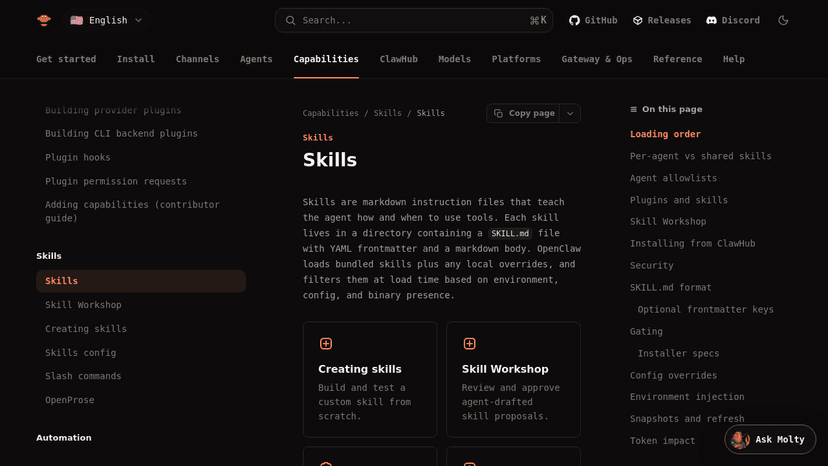
A skill is a directory containing a single SKILL.md file. The YAML frontmatter holds metadata (name, description, tool allowlist, requirements), and the markdown body is the agent-facing instruction set. According to the OpenClaw docs, skills are instructional rather than executable: they tell the agent how and when to call existing tools, not what code to compile. Builders evaluating where this fits in their stack often cross-reference broader AI agent tools before committing to a format.
In plain English: a skill is a recipe card. The frontmatter is the label, the markdown is the steps, and the agent is the cook deciding when to pull the card off the shelf.
The SKILL.md file format
The folder path is for human organization only. The skill's name, slash command, and allowlist key all come from the name frontmatter field, or fall back to the directory name when it's missing. That means you can group skills in subfolders like skills/research/ or skills/personal/research/ without changing the skill's identity. If you're cataloging similar agent patterns, the alternatives index on AI Directories is a handy reference.
How skills differ from plugins
Skills are individual markdown instruction units. Plugins are self-contained packages with their own openclaw.plugin.json manifest that can ship multiple skills, tools, and configuration entries together. The open Agent Skills format is not exclusive to OpenClaw either; OpenAI's documentation describes the same SKILL.md shape, which makes skills portable across agent ecosystems. Teams curating their own internal AI automation tools directory often track both formats side by side.
Takeaway: if it's one markdown file plus frontmatter, it's a skill. If it's a manifest plus bundled assets, it's a plugin.
How OpenClaw Loads and Prioritizes Skills

OpenClaw resolves skills from six sources, highest precedence first. When the same skill name appears in more than one source, the highest-precedence copy wins outright. The order matters because workspace-level skills always override bundled ones, which is what makes per-project customization possible without forking. If you maintain a stack of locally-running assistants, the local AI assistants listings give a sense of the wider category.
The six-level loading order
- Workspace skills (
<workspace>/skills) - Project agent skills (
<workspace>/.agents/skills) - Personal agent skills (
~/.agents/skills) - Managed or local skills (
~/.openclaw/skills) - Bundled skills shipped with the install
- Extra directories (
skills.load.extraDirs) plus plugin skills
A workspace skill named research will silently shadow a bundled research skill of the same name. No merge, no warning beyond the load log. This is the single most common source of "why isn't my skill running" confusion, and it's worth bookmarking the OpenClaw configuration notes alongside other agent setup references.
Per-agent vs. shared skill visibility
Skill location (precedence) and skill visibility (which agent can actually see a skill) are separate controls. Precedence decides which copy of a duplicate wins. Visibility, set through allowlists, decides whether a given agent is allowed to call it at all. Multi-agent setups depend on this separation, which is why multi-agent workflow patterns usually map allowlists per role.
Agent allowlists
Allowlists live in the agents config block. agents.defaults.skills sets the shared baseline. agents.list[].skills either inherits that baseline (when omitted), replaces it entirely (when set to a non-empty array), or exposes nothing (when set to []). A non-empty per-agent list does not merge with defaults; it fully replaces them. The effective allowlist then applies across prompt building, slash-command discovery, sandbox sync, and skill snapshots. If you're comparing this control model to other AI tool integrations, the explicit replace-not-merge behavior is unusual and worth flagging.
Takeaway: precedence answers "which file loads," allowlists answer "which agent can use it." Keep them separate in your head.
How Skills Extend OpenClaw's Capabilities
Skills are how OpenClaw goes from a generalist chat surface to something that actually ships work. Community-built skills on ClawHub cover web search, knowledge base lookup, code interpretation, calendar management, email handling, image generation, news monitoring, and translation. For founders running solo, that maps cleanly to the AI productivity tools most teams already evaluate.
Popular skill categories
The VoltAgent awesome-openclaw-skills repository catalogs over 5,400 filtered and categorized community skills, all sourced from the official ClawHub registry. The repo's filters tell you a lot about the registry's signal-to-noise ratio: 4,065 entries flagged as possible spam, 1,040 duplicates, 851 low-quality or non-English descriptions, and 886 crypto or trading skills excluded for category fit. Cross-referencing this with a curated AI tools directory before installing reduces the chance of pulling in a noisy or abandoned skill.
Plugin-shipped skills
Plugins can also ship their own skills by listing skill directories in openclaw.plugin.json, with paths relative to the plugin root. The official browser plugin, for example, ships a browser-automation skill for multi-step browser control. Builders chasing similar patterns often look at adjacent AI browser automation tools for inspiration. Plugin skill directories load at the same low-precedence level as extraDirs, so any workspace, managed, or agent skill with the same name will override them.
Takeaway: the breadth of ClawHub is real, but precedence rules mean your local copy almost always wins, which is usually what you want.
The Skill Workshop: Reviewing Agent-Drafted Skills
Skill Workshop is a proposal queue that sits between the agent and your active skill files. When the agent notices reusable work (a sequence of steps it keeps repeating, a tool combination that worked), it drafts a proposed skill rather than writing directly to SKILL.md. The pattern matters because it keeps the human in the loop on every change, which is the kind of guardrail you'd want from any AI agent management layer.
How the proposal queue works
You list pending proposals with openclaw skills workshop list, inspect individual proposals to see the drafted SKILL.md, and decide whether to apply or discard. The proposal is just a candidate file plus a diff; nothing touches your real skills directory until you say so. This separation gives reviewers a real artifact to evaluate, similar to how teams handle AI tool evaluation for any third-party agent extension.
Approving and applying proposals
Apply a proposal with openclaw skills workshop apply <proposal-id>. The workshop design means the agent cannot unilaterally modify its own skill files; human approval is a hard requirement before any skill change takes effect. If you're documenting agent governance for a team, this proposal-and-apply loop is one of the cleaner AI assistant features to point at.
Takeaway: the agent proposes, you dispose. No silent rewrites of your skill library.
Common Misconceptions About OpenClaw Skills
Skills get described in shorthand a lot, and the shorthand creates real misunderstandings. Three come up repeatedly, and each has a security implication. The broader AI security risks conversation around agent ecosystems usually starts here.
Misconception: Skills are compiled code / Reality: They are plain-text markdown
Skills are plain markdown. That makes them auditable in a text editor and trivial to diff in source control. It also means a skill's instructions can be written to direct malicious agent behavior, since the agent treats the markdown as authoritative direction. Practical AI tool safety habits (read the SKILL.md before installing, scan for outbound URLs and shell commands) apply directly.
Misconception: All community skills are safe / Reality: Malicious skills exist on public registries
Cybersecurity Dive reported in March 2026 that a top-downloaded "Twitter" skill on ClawHub was identified as macOS infostealing malware after binary analysis on VirusTotal. The VoltAgent registry separately excluded 373 skills flagged as malicious by published security audits, on top of more than 4,000 others filtered for spam, duplicates, and low quality. Treat ClawHub the way you'd treat any package registry: pin versions, read the source, and prefer maintained skills. The alternatives shortlists approach (compare before installing) translates well here.
Misconception: Skills are only for OpenClaw / Reality: The format is cross-platform
The Agent Skills format is documented by multiple vendors, including OpenAI. A malicious skill can therefore travel across any agent ecosystem that supports the same standard, not just OpenClaw. Portability cuts both ways, and the same logic applies to comparing AI tools alternatives when deciding which agent platform to standardize on.
Takeaway: plain-text is a feature for auditability and a risk for distribution. Read what you install.
Related Concepts in the OpenClaw Ecosystem
A few adjacent terms come up constantly in OpenClaw docs and community discussion. Quick definitions, in roughly the order you'll meet them.
ClawHub
ClawHub is OpenClaw's public skills registry, where developers publish and discover community-built skills. Installation runs through either the OpenClaw CLI (openclaw skills install <slug>) or the standalone ClawHub CLI (npx clawhub install <slug>). The registry sits alongside other AI agent platforms as one more distribution surface to monitor.
Skill Workshop
The proposal queue described above. Worth restating here because it's the mechanism that keeps ClawHub installs and agent-drafted skills under human control, similar to review steps used by other local AI tools.
Agent allowlists
JSON configuration objects that define exactly which skills each named agent is permitted to use. Allowlists are how you implement least-privilege access for multi-agent setups, and they pair well with the role-based patterns common to broader AI productivity tools deployments.
Plugins vs. skills
Plugins are self-contained packages with their own manifest and can bundle multiple skills, tools, and config entries. Skills are single instruction units. OpenClaw runs locally and stores memory, configuration, and credentials in predictable plain-text file locations, which is a design choice with real implications for any machine that holds corporate credentials. Reviewing your overall AI tools directory of locally-running software with that in mind is worth the hour.
Frequently Asked Questions
What is an OpenClaw skill and how does it work?
A skill is a SKILL.md markdown file with YAML frontmatter that teaches a locally-running OpenClaw agent how and when to use specific tools or workflows. The agent reads the instructions and decides when to invoke them.
How do I install a skill in OpenClaw?
Run openclaw skills install <skill-slug> from the OpenClaw CLI, or use npx clawhub install <skill-slug> from the standalone ClawHub CLI. You can also drop the skill folder into your workspace skills directory manually.
What is ClawHub and how is it related to OpenClaw skills?
ClawHub is OpenClaw's public skills registry where developers publish community-built skills. It functions like a package registry: you browse, install, and update skills from it, and most third-party skills you encounter originate there.
Can OpenClaw skills be dangerous or malicious?
Yes. Because skills are plain-text instructions the agent treats as authoritative, a malicious skill can direct the agent to exfiltrate credentials or run harmful commands. Researchers have already documented infostealer skills on ClawHub.
How does OpenClaw decide which skill takes priority when there are duplicates?
OpenClaw uses a six-level precedence order: workspace skills win, then project agent skills, personal agent skills, managed skills, bundled skills, and finally extra directories including plugin skills. The highest-precedence copy fully replaces any lower one.
What is the OpenClaw Skill Workshop?
Skill Workshop is a proposal queue where the agent drafts new or updated skills for human review. You list, inspect, and apply proposals via the CLI, so the agent never writes directly to your active SKILL.md files without approval.
Are OpenClaw skills compatible with other AI agents?
The Agent Skills format is an open standard documented by multiple vendors including OpenAI. A SKILL.md skill written for OpenClaw can often be used by other agents that support the same format, though tool bindings may differ.
How do I restrict which skills an agent can use in OpenClaw?
Use agent allowlists in your OpenClaw config. Setting agents.list[].skills to a specific array replaces the defaults entirely for that agent. An empty array exposes no skills, useful for locked-down agents.
Conclusion
OpenClaw skills are a thin format with thick implications: plain-text markdown that drives real actions on a real machine, with precedence rules, allowlists, and a human-in-the-loop workshop layer doing the safety work. If you're standardizing on an agent stack, treat the SKILL.md format as both an interoperability win and an attack surface, and keep your install habits tight. For ongoing tracking of adjacent tools, the AI Directories blog catalogs what's shipping across the agent and automation space.