Introduction
AI is moving quickly from “experimental” to “operational,” and I’ve been hunting for tools that don’t just show off flashy demos but actually help teams automate real work. That’s what drew me to RoboWork a no-code AI agent platform that promises to let anyone build, chain, and deploy intelligent agents in minutes. After spending time setting up workflows for sales and operations, I found that RoboWork doesn’t just check the boxes—it makes multi-agent orchestration approachable for teams of any size.
What is RoboWork?
 RoboWork is essentially a no-code AI automation hub. Instead of being locked to one model or tool, it gives you a drag-and-drop way to create AI agents, chain them into complex workflows, and deploy them either internally (say, to automate data entry or support) or publicly (like customer-facing bots).
What makes it stand out is its support for multiple leading AI models—ChatGPT, Claude, Gemini, and its own RoboWorkAI—combined with features like human-in-the-loop reviews, knowledge base integration, white-label deployment, and auto-reflection for smarter iterations.
In short, it’s not just a chatbot builder; it’s a full AI operations platform.
How it Works
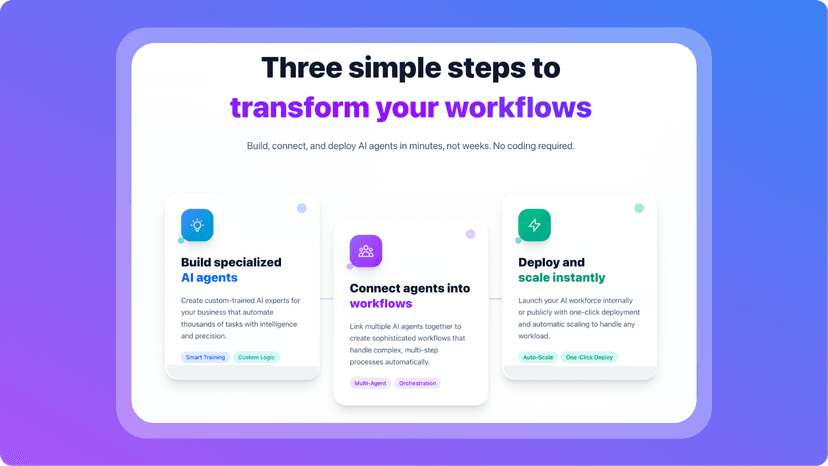
My first workflow in RoboWork took less than 30 minutes to set up. The process felt a lot like configuring a visual pipeline:
- Create an agent – Define its purpose (sales outreach, data cleaning, customer replies, etc.) and select the underlying AI model.
- Train it quickly – Upload files, connect a knowledge base, or feed in URLs for contextual grounding.
- Chain agents – Link multiple agents together (e.g., one agent drafts personalized emails, another validates tone, a third schedules the send).
- Add checks & balances – Insert human review stages where needed, or let RoboWork’s auto-reflection refine the workflow.
- Deploy – Push the workflow live via REST API, embed it on a site, or use its white-label option.
What struck me most was the MCP (Model Context Protocol) support. This makes integrations seamless—you can plug RoboWork into your existing stack without hacking together brittle connections.
My Personal Experience
I tested RoboWork on two fronts: sales outreach and content ops. For sales, I built an agent chain that pulled prospect info, drafted emails, checked them for compliance tone, and queued them in HubSpot. It shaved hours off what I’d normally delegate to a team member. On the content side, I had agents brainstorm blog ideas, fact-check against uploaded PDFs, and create outlines ready for human polish.
The surprising part? RoboWork didn’t break when scaled. I ran hundreds of tasks in parallel, and everything executed smoothly with 99.9% uptime. Having tried other platforms that buckle under volume, this reliability made a huge difference. It honestly felt like I had a small digital workforce running in the background.
Pricing
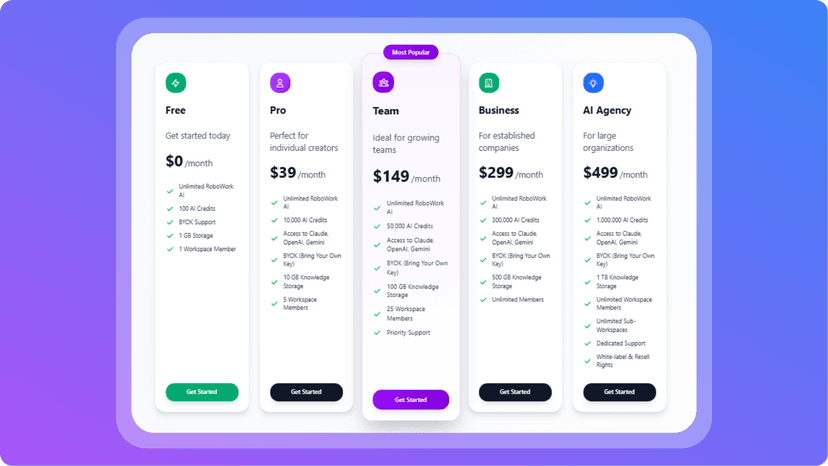
RoboWork offers both monthly plans and lifetime deals, making it flexible for solo users, teams, and agencies:
- Free — $0/mo: Unlimited RoboWork AI, 100 AI Credits, BYOK, 1 GB storage, 1 member
- Pro — $39/mo: 10,000 AI Credits, access to Claude/OpenAI/Gemini, BYOK, 10 GB storage, 5 members
- Team — $149/mo: 50,000 AI Credits, BYOK, 100 GB storage, 25 members, Priority Support
- Business — $299/mo: 300,000 AI Credits, BYOK, 500 GB storage, Unlimited members
- AI Agency — $499/mo: 1,000,000 AI Credits, BYOK, 1 TB storage, Unlimited members & sub-workspaces, white-label/resell rights, Dedicated Support
- Lifetime Deals (BYOK): Business $999 one-time; AI Agency $2,999 one-time
This tiered approach makes RoboWork accessible at entry level while scaling up to enterprise and agency-grade features.
Pros and Cons
Pros:
- True multi-agent orchestration without coding
- Integrates major LLMs (ChatGPT, Claude, Gemini, etc.)
- MCP + REST API for clean integrations
- Human-in-the-loop + auto-reflection support
- White-label deployment available
- Proven scale (50M+ tasks, 10K+ teams)
Cons:
- Can feel overwhelming at first if you’ve never worked with workflows
- Some advanced features require technical familiarity to maximize
Conclusion
RoboWork feels like the kind of platform that separates “AI toys” from “AI infrastructure.” It’s robust enough for enterprises but flexible enough that a solo operator could spin up useful automations in an afternoon.
The fact that it supports multiple models, integrates knowledge bases, and lets you embed or white-label agents makes it more than just another no-code builder—it’s closer to an AI operating system for business.
If you’ve tried specialized automation tools like SocialAF.ai for social workflows or AskTuring for knowledge base querying, RoboWork sits in that same spirit but with a far broader scope. For teams looking to offload repetitive processes and experiment with intelligent automation without diving into code, RoboWork is one of the strongest contenders I’ve used so far.