Getting a TikTok transcript used to mean hours of manual typing. Today, AI-powered tools convert any public TikTok video to text in seconds, with no app download or account required. Whether you need the text for content repurposing, research, accessibility, or SEO, this guide walks through every method, including the free TikTok Transcript Generator from Transclipper, so you can pull any video's spoken words in a few clicks.
What You'll Need Before You Start

This is a beginner-level workflow. Total time budget: under two minutes per video once you know the flow. You don't need a TikTok account, a paid subscription, or any installed software. A modern browser and a copied URL are the only real prerequisites, which is why this method scales cleanly for anyone auditing dozens of competitor clips in an afternoon.
Prerequisites and time budget
- A public TikTok video URL (private videos are off-limits to third-party tools).
- A desktop or mobile browser. Chrome, Safari, Firefox, and Edge all work.
- 5 to 30 seconds of processing time per video. Short-form clips of 15 to 60 seconds usually return text in under 10 seconds.
- Optional: a text editor or Google Doc open in another tab to paste the transcript into for cleanup.
If you're building a repeatable content workflow around this, browse the broader AI tools directory to pair a transcript step with downstream writing, editing, or repurposing tools.
What types of TikTok videos can be transcribed
Clean voiceovers, single-speaker talking-head clips, and tutorials transcribe with the highest accuracy. Music-only videos, dance clips, and heavily edited sound-effect content will return blank or garbled results because there is no coherent speech track to process. Very strong regional accents and overlapping speakers also drag accuracy down. If a video mixes speech with loud background music, expect to clean the transcript by hand. For short-form video editing that pairs well with transcription, Opus Clip is a common companion tool.
Takeaway: copy the public URL first, verify the video has clear speech, and everything downstream is fast.
Before You Start: Nothing to Back Up for This One
Browser-based TikTok transcription is non-destructive. No files land on your device, nothing gets overwritten, and there's no undo state to preserve. That said, there are a few upfront pitfalls that save time if you know them now rather than after a failed run.
Potential pitfalls to know upfront
- Server-side processing. Most free tools upload the video's audio to their servers for a few seconds. If the clip contains sensitive information, read the tool's privacy policy first.
- TikTok's terms of service. TikTok restricts automated data extraction at scale. Casual use of a web tool is fine for a handful of videos; scraping thousands programmatically should use a documented API instead.
- Accuracy is not guaranteed. Even the best AI engines miss brand names, proper nouns, and jargon. Always review before publishing quotes or captions.
- Nothing to undo. If a transcript looks wrong, you just rerun it. That's the whole recovery plan.
For creators repurposing video content into blog posts or social captions after transcription, tools listed under AI content generators can pick up where the transcript leaves off.
Takeaway: paste, generate, review. There is no backup step because there is no risk of data loss.
Step-by-Step: How to Get a TikTok Transcript Using a Free Online Tool
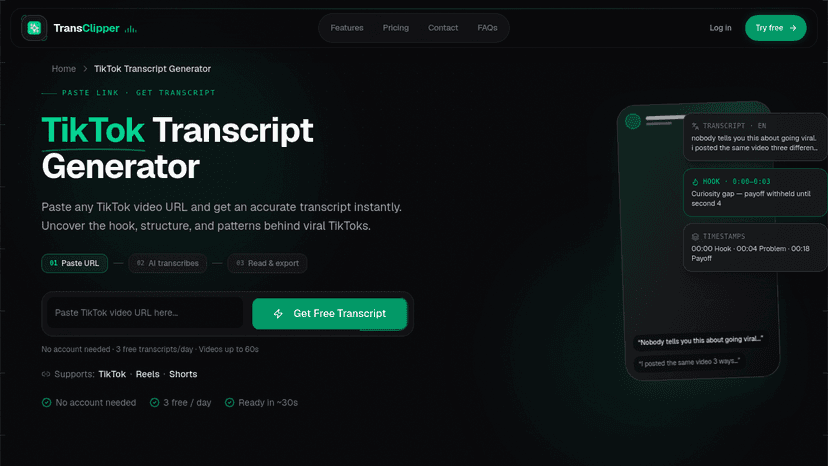
Here is the exact flow that works across every browser-based tool, from Transclipper to GetTheScript to Saveto AI. The mechanics barely differ between them, so this is a portable recipe.
Step 1: Copy the TikTok video URL
On mobile, tap the Share icon on the right side of the video, then tap Copy link. On desktop, open the video in a browser and copy the URL directly from the address bar. Either format works with most modern transcript generators. You should now have a string like https://www.tiktok.com/@username/video/123456 on your clipboard. If you copied a shortened vm.tiktok.com link, open it in a browser first to resolve the full URL, then copy again. Many creators pair this step with tools from the AI tools alternatives library when scoping which transcript engine to trust.
Step 2: Paste the URL into the transcript generator
Open your chosen tool and paste the URL into the single input field. No formatting, no https:// prefix trimming, no extra parameters. Tools such as the TikTok Transcript Generator accept the raw link as-is. Click the Generate or Get Transcript button. For a broader look at how AI tools slot into a creator's stack, the AI Directories blog covers workflow patterns across writing, video, and social.
Step 3: Generate and review your transcript
Most engines return a full text block within 3 to 10 seconds for short-form clips, according to published tool documentation from Transclipper. Read the transcript once end to end. Scan specifically for mishearings of brand names, technical terms, and proper nouns. These are the most common accuracy failure points across every AI transcription engine. If you plan to feed the transcript into another tool, a directory like aidirectori.es is a useful place to shortlist writing or editing apps that accept pasted text.
Step 4: Export or copy the transcript text
Export formats vary by tool. Common options:
| Format | Best use |
|---|---|
| TXT | General text reuse, pasting into docs |
| SRT | Adding captions to TikTok, YouTube, or Instagram |
| VTT | Web video captioning (HTML5 players) |
| Sharing a clean, read-only version | |
| DOCX | Editing in Word or Google Docs |
Choose SRT if captions are the goal, otherwise TXT is usually enough. For teams pairing captions with short-form editing, Opus Clip's automated captioning is a common next step.
Takeaway: four clicks, one URL, one review pass, one export. That's the whole loop.
Alternative Methods to Get a TikTok Transcript
Web tools cover 90% of use cases, but three alternatives matter for edge cases: TikTok's own captions, browser extensions, and developer APIs.
Use TikTok's built-in auto-captions (limited)
TikTok generates on-screen auto-captions for your own uploads under Settings > Captions. The catch: the captioned text is not exportable as a file from the app. You can toggle captions on or off for viewers, but there is no built-in "download transcript" button. This is why third-party tools exist in the first place. If you're evaluating creator tools broadly, browse the AI tools tag index to find category-specific options.
Use a browser extension
Chrome extensions like TokScript let you copy a transcript directly from the TikTok watch page with a single click. No URL copying, no tab switching. This is the fastest option for creators reviewing 20 or more competitor videos in a research session. Extensions do require install trust, so vet the publisher first. For adjacent creator apps, the AI Directories homepage lists tools across writing, video, and audio.
Use API for bulk transcription
For developers and teams processing TikTok videos at scale, the TransClipper API provides a simple REST API for retrieving TikTok transcripts programmatically. Instead of copying text manually, you can automate transcript extraction for competitor research, content analysis, trend monitoring, or AI-powered workflows. Plans include 500 API requests/month on Pro, 1,500 requests/month on Business, and an API-only plan starting at $9/month, with support for videos up to 5–10 minutes long.
Once you've retrieved the transcripts, you can feed them into ChatGPT, Claude, or your own AI pipeline to summarize videos, identify viral hooks, extract key insights, generate captions, or build custom analytics tools.
Once you've retrieved the transcripts, you can feed them into ChatGPT, Claude, or your own AI pipeline to summarize videos, identify viral hooks, extract key insights, generate captions, or build custom analytics tools.
Takeaway: web tool for one-offs, extension for research sessions, API for scale.
What to Do With Your TikTok Transcript
A transcript is raw material. The real use sits in what you do with it next.
Content repurposing and SEO
The spoken script already contains structured ideas. Reshape a 60-second TikTok transcript into a LinkedIn post, a newsletter blurb, or a blog intro in minutes. Marketers use transcripts to analyze competitor ad scripts, mine trending phrases, and build keyword lists that plug straight into an SEO workflow. For creators publishing regularly, browse the AI generator tools list to find the writing engine that fits your voice.
Research, study, and accessibility
Students and researchers pull transcripts to build study notes, compare phrasing across creators, or seed a dataset without watching each video in full. Accessibility teams use SRT exports to add accurate captions on TikTok, YouTube, or Instagram, which improves watch time and opens content to hearing-impaired viewers. If long-form research is the goal, tool discovery on the AI Directories alternatives hub helps narrow the field fast.
Subtitles and multilingual translation
Paste a transcript into your preferred translation tool, then export it as an SRT file and sync it back to the original video. TransClipper supports transcription in multiple languages, making it easy to translate TikTok videos, create multilingual subtitles, and reach a global audience. Once translated, you can re-export the subtitles as an SRT file for use on TikTok, YouTube Shorts, Instagram Reels, or other video platforms.
Takeaway: the transcript is the input; repurposing, captioning, and translation are where the ROI shows up.
Troubleshooting Common TikTok Transcript Problems
Most transcript failures fall into five buckets. Match the symptom, apply the fix.
- Symptom: blank transcript. Cause: the video contains no spoken audio (music-only or silent). Fix: confirm the clip has clear speech before running it again.
- Symptom: garbled or error-filled text. Cause: heavy background music, overlapping speakers, or strong regional accents. Fix: try a second engine. According to ElevenLabs' documentation, its Scribe model handles 99 languages and diverse accents.
- Symptom: "video unavailable" error. Cause: the video is private, deleted, or geo-restricted. Fix: open the URL in an incognito window to verify it plays publicly, then paste again.
- Symptom: tool times out. Cause: free-tier length caps. Fix: switch to a tool that documents longer video support, such as Saveto AI or ElevenLabs.
- Symptom: URL not recognized. Cause: the link is a shortened
vm.tiktok.comshare URL. Fix: open it in a browser first, then copy the full resolved URL from the address bar.
For creators who need audio-adjacent tools like voice generation or music, the AI song generator page sits in the same broader stack.
Takeaway: almost every failure is either "no speech in the video" or "wrong URL format." Fix those first.
Frequently Asked Questions
How do I get a transcript from a TikTok video for free?
Copy the public TikTok URL, paste it into a free web tool like Transclipper, GetTheScript, or Saveto AI, and click Generate. Most tools return the full transcript in under 10 seconds with no signup required.
Can I get a TikTok transcript without downloading an app?
Yes. Every method covered in this guide runs entirely in the browser. There is no app to install, no account to create, and no software to update. A URL and a browser tab are the only requirements.
Why is my TikTok transcript blank or not working?
The most common cause is a video with no clear spoken audio: music-only clips, dance videos, or silent trends. The second most common cause is a shortened vm.tiktok.com link. Resolve the URL in a browser first.
Does TikTok have a built-in transcript or caption export feature?
TikTok generates on-screen auto-captions for your own videos through Settings, but there is no native export button. To get a downloadable transcript file, you need a third-party web tool, browser extension, or API.
How accurate are AI TikTok transcript generators?
Leading engines advertise 95% to 99% accuracy on clear speech. Real-world accuracy drops with background music, accents, or multiple speakers. Always review brand names, proper nouns, and technical terms before publishing anything verbatim.
Can I get transcripts for TikTok videos in languages other than English?
Yes. TransClipper supports transcription in multiple languages, allowing you to extract transcripts from TikTok videos in their original spoken language. Simply paste the TikTok URL, and TransClipper automatically detects the language and generates an accurate transcript. You can then translate it, summarize it with AI, or export it for subtitles and other workflows.
What file formats can I export a TikTok transcript in?
Common export formats include TXT, SRT, VTT, PDF, and DOCX. Choose SRT for captions on TikTok, YouTube, or Instagram. TXT is simplest for reuse in a blog post or AI prompt. PDF is best for read-only sharing.
Can I transcribe multiple TikTok videos at once?
Yes. Tools like TransClipper support batch processing of up to 50 links at a time. Developer APIs such as ScrapeCreators and TransClipper return structured JSON per video, which is the cleaner option for automated pipelines and competitor-research dashboards.
Wrapping Up
TikTok transcripts unlock repurposing, research, and accessibility with almost no friction. The workflow is short: copy the public URL, paste it into a browser-based tool, review the output, and export in the format your next step needs. For one-off transcripts, the free TikTok Transcript Generator by TransClipper referenced throughout this guide is the fastest starting point. For a broader stack of creator tools that pair with transcription (writing, editing, captioning, translation), the AI Directories catalog is where most operators start their shortlist.